App Platform
App Platform runs your container image behind an https:// URL and scales it with
traffic — down to nothing when nobody is using it. You bring the image; the platform pulls it,
starts it, terminates TLS, routes requests, rolls out new versions without downtime and bills
you only for the replica-minutes that actually ran.
At a glance
- What you provide: a container image (public or private registry), the port it listens on, a size, a replica range and any environment variables.
- What you get: a live
https://URL in thezm-lsk-1(Lusaka) region, optional custom domains with automatic certificates, a deploy history with one-click rollback, live logs and an interactive shell. - Scaling: between a minimum and maximum number of replicas. A minimum of
0means the app scales to zero when idle and costs nothing; the next request wakes it (a cold start). - Billing: by the replica-minute from your organisation's prepaid wallet, in Kwacha. An idle app scaled to zero costs nothing.
- Manage it from: the console (App Platform in the sidebar),
the
cloudCLI or the HTTP API — all three do the same things.
When to use App Platform
Use it for anything that answers HTTP: websites, APIs, webhook receivers, back-office tools. If your software runs in a container, or can be packaged as one, this is usually the simplest home for it — there is no operating system to patch, no reverse proxy to configure and no certificate to renew.
Choose something else when:
- You need to keep files on disk. A replica's filesystem is temporary: anything written to it is gone when that replica stops or is replaced. Keep data in a managed database or in object storage.
- You need a full operating system, root access to install system packages, a protocol other than HTTP (raw TCP, UDP, SMTP), or a dedicated public IP address — use a virtual machine.
- You run a background worker that never receives requests. A worker scaled to
zero is never woken, because only an incoming request wakes an app. Set its minimum to at least
1(and accept that it is billed all the time), or run it on a virtual machine.
What an app is made of
Every app is defined by a handful of settings. All of them except the name can be changed later.
Name
Lowercase letters, digits and hyphens, starting and ending with a letter or digit, up to 63 characters. It must be unique among the live apps in your organisation; once an app is deleted its name is free again. The CLI and API address an app by this name. In the console, anything else you type (capitals, spaces, dots) is converted to lowercase and hyphens.
Image
Any OCI/Docker image reference, for example nginx:1.27, ghcr.io/acme/api:1.4.2 or registry.example.com/team/web:2026-10-01. The
image must be built for linux/amd64 — an image built only for ARM (the default on
Apple-silicon Macs) fails to start; build with docker buildx build --platform linux/amd64.
Prefer an explicit version tag over latest. Each deploy of a new tag is a clean,
traceable revision you can roll back to; re-pushing the same tag is not picked up unless you force
it (see Nothing to roll out).
Private registries
Public images need nothing. For a private image (GitHub Container Registry, a private Docker Hub
repository, your own registry), give the platform a registry server, a username and a password or access token with pull access. The
server is the registry host — ghcr.io, registry.example.com, or index.docker.io/v1/ for Docker Hub.
The password is stored encrypted and is never shown again — not in the console, the API or the CLI. You can see which server and username are saved, replace the credentials (for example to rotate a token) or remove them. If the credentials are wrong or have expired, the deploy fails with “Image pull was refused by the registry: authentication failed” and the registry's own words.
Port
The port your container listens on for HTTP, from 1 to 65535; the default is 8080. The
platform terminates HTTPS at the edge and forwards plain HTTP to this port, so your container never
deals with certificates. Two things to get right:
- Listen on
0.0.0.0(all interfaces), not127.0.0.1— otherwise the platform cannot reach your app and the deploy fails its health check. - The platform passes the port to your container in the
PORTenvironment variable. ReadingPORTis the most portable way to listen on the right one. Do not setPORTyourself.
An app has exactly one port. Requests on any path of the URL go to it.
Size
A size (shown in the console as the app's plan) sets two things for each replica: the vCPU it may burst up to when busy, and the memory it is guaranteed. It also sets the price per replica-hour. The current sizes and prices are on the pricing page and in the size picker on the create form.
- CPU is shared: a replica always gets a slice and can burst up to its size's full vCPU when it needs it. Running out of CPU makes an app slower, not broken.
- Memory is reserved and is a hard ceiling. A replica that tries to use more than its size's memory is stopped and restarted. If that keeps happening, move to a larger size.
You choose a size at creation. Through the API and CLI, an app created without one gets the smallest available size.
Minimum and maximum replicas
A replica is one running copy of your container. The platform keeps the number of replicas between
your minimum (0–100) and maximum (1–100), adding
them as traffic rises and removing them as it falls. The maximum must be at least the minimum —
the console, CLI and API all refuse a minimum above the maximum. See Scaling for how to choose.
Environment variables
Name/value pairs your app reads at start-up: database URLs, API keys, feature flags. Names must
start with a letter or underscore and contain only letters, digits and underscores
(DATABASE_URL, LOG_LEVEL). In the console you can add them one by one or Import .env from a text file of KEY=VALUE lines.
Changing variables always rolls out a new revision — your running replicas keep their old values until the new revision takes over. See Changing an app.
Create an app
You need an organisation with credit in its wallet, and the owner or admin role in it — creating an app starts a charge, so members and viewers cannot (the console only offers organisations where you may create). The balance must cover about a month (730 hours) of the app at its maximum replicas — in the console, the CLI and the API alike — and the organisation must not be suspended. If the balance is short the refusal says by how much; the console disables Deploy App and links you to a top-up of exactly the shortfall.
In the console
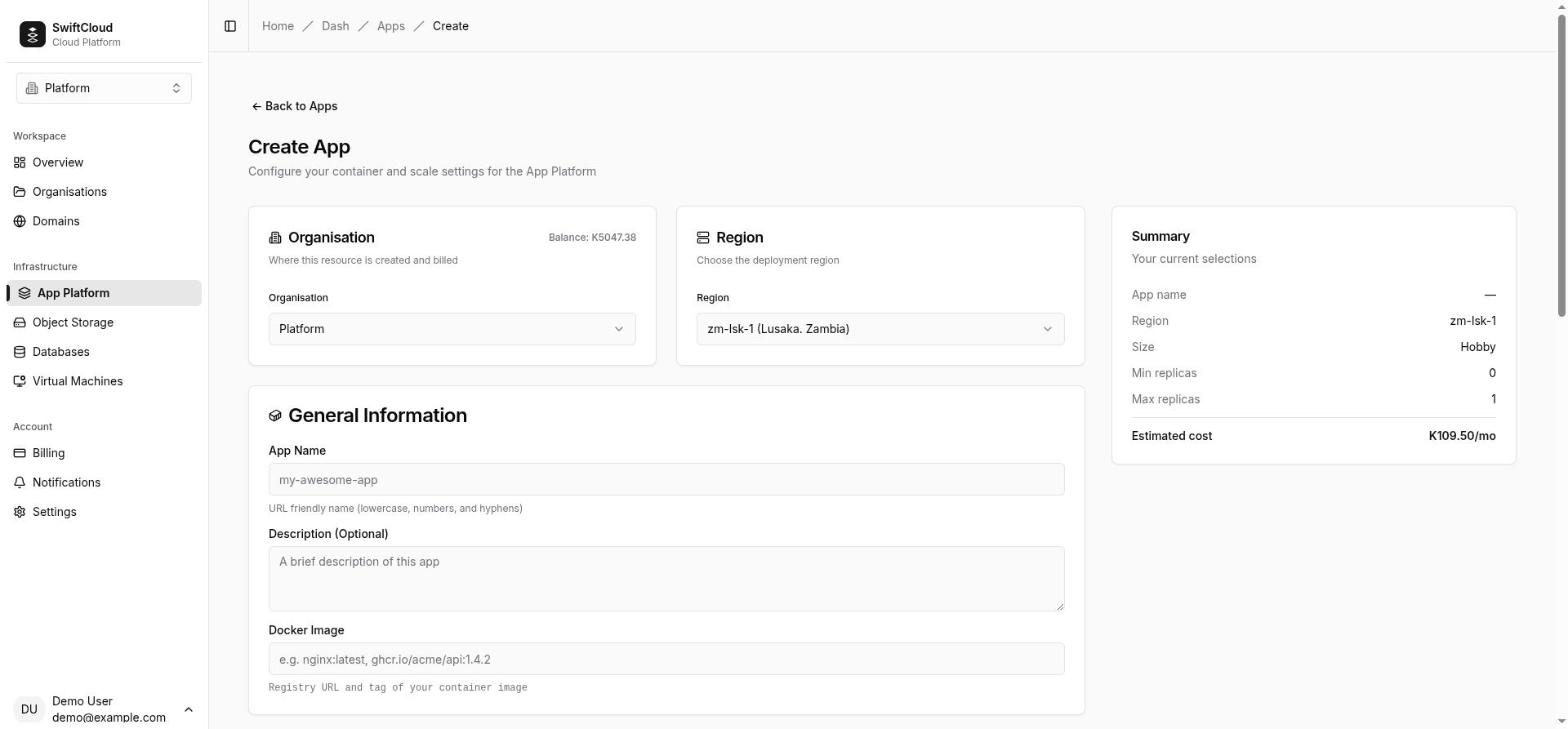
- Open App Platform → Create app (
/dash/apps/create). - Pick the organisation to bill and the region (
zm-lsk-1). - Under General information, enter the app name, an optional description and the Docker image.
- Choose a size.
- If the image is private, switch on Container registry auth and enter the server, username and password or token.
- Under Configuration & scaling, set the container port and the minimum and maximum replicas. The form shows the replicas you could be billed for and the monthly cost range as you type.
- Add environment variables, or import a
.envfile. - Press Deploy App. You land on the app list; open the app to watch it go from Deploying to Ready. The app page updates live.
With the CLI
# A public image; --image is the only required flag
cloud app create web --image nginx:1.27 --port 80 --wait

# Your own image, a size, a replica range and environment variables
cloud app create api --image ghcr.io/acme/api:1.4.2 --size app-1 \
  --port 3000 --min 0 --max 5 \
  --env NODE_ENV=production --env TZ=Africa/Lusaka --wait

# A private registry: the password is read from stdin, never from the command line
echo "$REGISTRY_TOKEN" | cloud app create api --image ghcr.io/acme/api:1.4.2 \
  --registry-server ghcr.io --registry-username deploy-bot --registry-password-stdin --wait
Flags and their defaults: --port 8080, --min 0, --max 3, --region from your context or CLOUD_REGION, --size the
smallest available, --env KEY=VALUE (repeatable), --description. With --wait the CLI prints each status change and exits when the app is ready (printing its
URL) or has failed (printing the reason, with a non-zero exit code). --timeout bounds
the wait (default 10 minutes).
What happens next
The app is recorded immediately with status deploying. The platform then pulls the
image, starts the first replica and checks that it accepts connections on your port. When that
first revision is serving, the status becomes ready and the URL appears. If the image
cannot be pulled, the container exits, or nothing answers on the port, the status becomes failed with a reason you can act on — see When something goes wrong. An app that is still
deploying, or that failed before ever serving, has no replica serving and so costs nothing.
Even with a minimum of 0, the first replica starts so the deploy can be proven; it
then scales to zero once idle.
Your app's URL
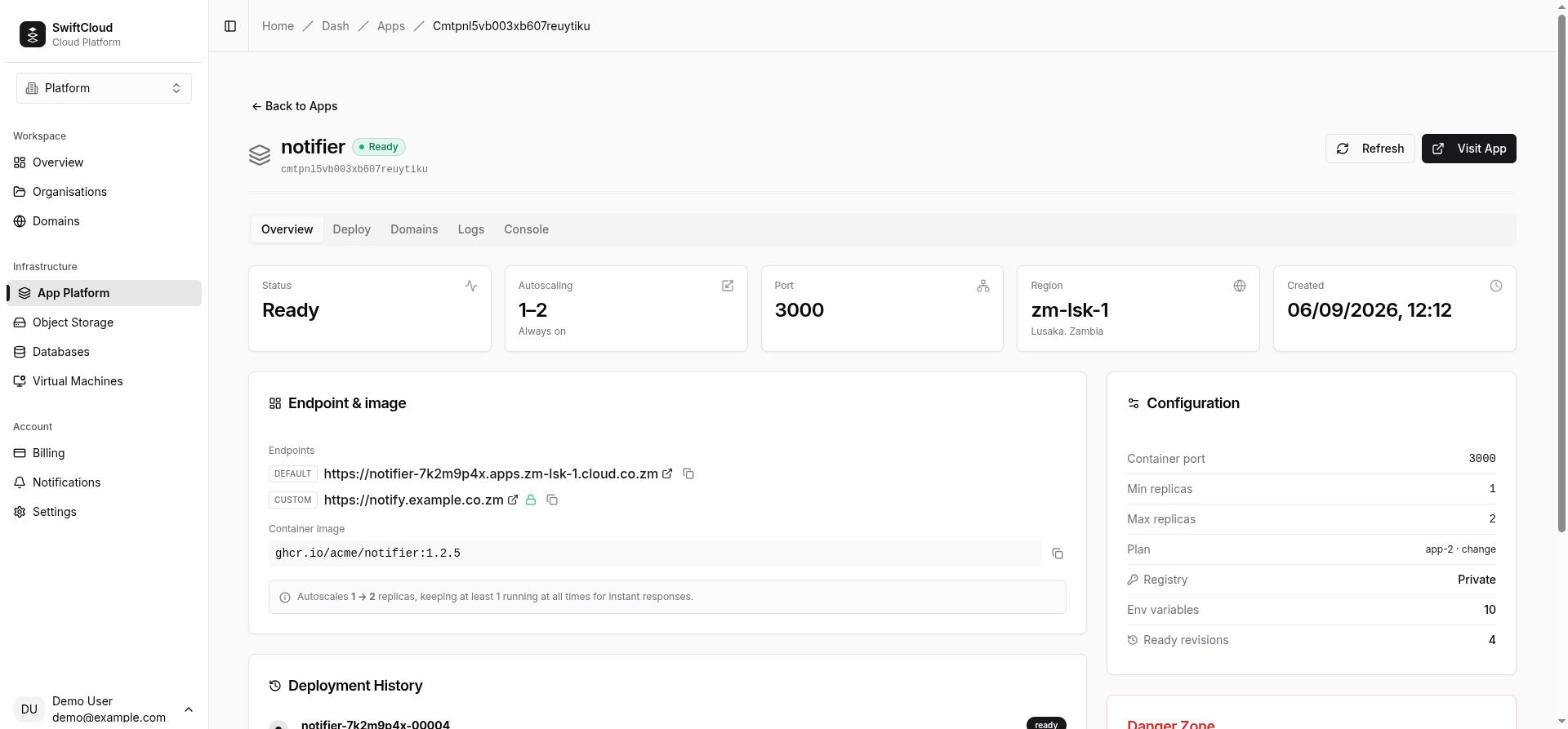
Every app gets its own address on the region's app domain, made of the app's name and a short random suffix:
https://<name>-<suffix>.apps.zm-lsk-1.cloud.co.zm
# for example
https://web-k3v9x2qa.apps.zm-lsk-1.cloud.co.zm
The suffix keeps every app's address unique across the platform, so two organisations can both
have an app called web. The URL is fixed for the life of the app — redeploys, rollbacks
and size changes do not change it — and it is always https:// with a valid
certificate. Find it on the app page (Visit App, or the copy button in Endpoint & image), with cloud app get <name>, or in the url field of the API. To serve the app on your own hostname, add a custom domain.
How requests reach your app
Visitors connect over HTTPS to the platform edge in zm-lsk-1, which presents the
certificate for your app URL or custom domain and forwards the request as plain HTTP to your
container's port. When several replicas are running, requests are spread across them. When none is
running, the request is held — not refused — while a replica starts, and is then delivered. Because
TLS ends at the edge, your container receives plain HTTP even though visitors use HTTPS. If your
framework forces HTTPS by redirecting plain-HTTP requests, turn that off — or check it in staging
first — so it does not redirect requests that were in fact secure.
Scaling
The platform watches how many requests each replica is handling at once. As concurrent requests climb it adds replicas, up to your maximum; as they fall it removes replicas, down to your minimum. You do not configure thresholds — you set the range.
Scale to zero (minimum 0)
With a minimum of 0, the app runs no replicas after it has had no requests for a short
while (around a minute). While it is at zero it costs nothing. The next request wakes it: a replica
is started and the request is answered as soon as the replica is ready. That first response is
slower — the cold start. How slow depends on your app: the time to start a
container plus the time your app takes to boot and open its port. A small, quick-booting image wakes
in a few seconds; a large image or a framework that does heavy work at start-up takes longer.
Good for: staging and preview environments, internal tools, low-traffic sites, anything bursty.
Always on (minimum 1 or more)
With a minimum of 1 or more, that many replicas run at all times, so there is never a
cold start — and you pay for them every minute, busy or not. Choose this for public sites and APIs
where a slow first response is unacceptable, and for anything that must keep running between
requests (a scheduler, a queue consumer, an open WebSocket).
Choosing the maximum
The maximum is both your capacity ceiling and your cost ceiling: the most an app can ever cost is
its maximum replicas running every minute. Set it high enough for your busiest hour. A maximum
above 1 also means your app must cope with several copies running at once — keep
sessions and uploads in a database or object storage, not in a replica's memory or disk.
Changing the range
In the console, open the app's Deploy tab, change Min scale and Max scale, and press Deploy New Revision. From the terminal:
cloud app scale web --min 1 --max 5   # always on, up to five
cloud app scale web --max 10          # raise the ceiling, keep the floor
cloud app scale web --min 0           # allow scale to zero when idle
A change to the range rolls out like any other change, without downtime.
Deploying new versions
Every change to an app — a new image, new environment variables, a different port, a new replica range, new registry credentials or a larger size — creates a new revision: an immutable snapshot of the image and settings. Revisions roll out without downtime.
How a rollout works
The new revision is started alongside the current one. Its image is pulled, the container starts, and the platform checks that it accepts connections on the app's port. Only when that check passes does traffic move to the new revision; the old one then finishes the requests it is handling and is stopped. Visitors never see a gap.
A deploy counts as ready only when a new revision exists and is the one
serving traffic. The platform does not take “the app is up” as proof, because during a rollout the
old revision is up the whole time. If the new revision never becomes ready, the app's status turns failed with the reason, and the previous revision keeps serving — a bad
deploy does not take your site down. The app's servingRevision and latestRevision (in the API and in cloud app get) show exactly which
revision is answering and which is newest; while they differ, a rollout is in progress or has
stalled.
Deploy in the console
- Open the app and go to the Deploy tab.
- In Deploy New Revision, change the image tag and anything else you want: port, min/max scale, registry credentials, environment variables. Switch on Force a new revision to roll the app even if nothing in the form changed (see Nothing to roll out).
- Press Deploy New Revision. The Overview tab's Deployment History shows the new revision as it starts, then its outcome.
Deploy with the CLI
cloud app deploy web --image ghcr.io/acme/web:1.4.3 --waitcloud app deploy changes only the image; port, replica range, environment variables and
domains are kept. With --wait, the CLI shows the rollout as it happens (for example rolling out web-…-00004 (web-…-00003 still serving)) and exits non-zero if it fails.
Nothing to roll out
If you deploy exactly what is already running — the same image tag with the same settings — no revision is created, and the platform says so instead of reporting a success:
Nothing to roll out: ghcr.io/acme/web:latest is already running. Push the build under a
new tag, or force a redeploy to roll the same tag again.
This most often happens when you rebuild an image and push it under the same tag (latest, main). The platform does not know the tag now points at a different
build. Either push under a new tag (recommended), or force a redeploy, which creates a new
revision and fetches whatever the tag points at now:
- In the console: when the Overview tab shows “Nothing to roll out” under Last failure, press Force a redeploy of the current image. It opens the Deploy tab with Force a new revision switched on; press Deploy New Revision. You can also switch Force a new revision on yourself at the bottom of the Deploy form at any time.
- From the terminal:
cloud app deploy web --image ghcr.io/acme/web:latest --force --waitDeployment history
The Deployment History card on the Overview tab lists each revision with its image,
when it was created and its outcome: ready (it served), deploying (still
starting) or failed (with the reason). The three newest are shown; View earlier
revisions expands the list. The CLI equivalent is the API's deployments list (see API).
Rolling back
To go back to an image that worked, use Switch Revision at the top of the Deploy tab: pick a revision that reached ready and press Switch. The platform redeploys only that revision's image, as a
new revision, with the app's current settings: the replica range (scaling), port,
environment variables and registry credentials are not restored from the old revision,
because they are not recorded per revision. It rolls out like any deploy — the current revision
serves until the rolled-back one is ready.
From the terminal, a rollback is a deploy of the earlier tag:
cloud app deploy web --image ghcr.io/acme/web:1.4.2 --waitChanging an app
Everything except the name and region can change after creation. Each change below creates a new revision and rolls out without downtime; the running replicas keep the old configuration until the new revision takes over.
Environment variables
In the console, edit the list in the Deploy tab (or Import .env) and press Deploy New Revision. The form saves exactly the rows shown, so removing a row removes that variable. With the CLI, change one variable without touching the rest:
cloud app env list web                       # names, values masked
cloud app env list web --show-values         # reveal values
cloud app env set web LOG_LEVEL=debug TZ=Africa/Lusaka
cloud app env set web --env-file .env        # every KEY=VALUE line in a file
cloud app env set web --from-stdin STRIPE_KEY < key.txt   # keep a secret out of shell history
cloud app env unset web OLD_FLAG LEGACY_URL
env set and env unset read the current set, apply your change and write
the whole set back. If two people change variables on the same app at the same moment, the last
write wins and the other change is lost — coordinate, or re-check with env list.
Port, description and registry credentials
In the console, use the Deploy form. With the CLI:
cloud app update web --port 3000
cloud app update web --description "public website"

# rotate a registry token (the password comes from stdin)
echo "$NEW_TOKEN" | cloud app update web \
  --registry-server ghcr.io --registry-username deploy-bot --registry-password-stdin

# the image is public now: forget the stored credentials
cloud app update web --clear-registry
In the console's Deploy form, the saved password is never shown: leave the password field blank to keep it (as long as the server is unchanged), type a new one to replace it, or switch Registry Authentication off to remove the credentials.
Size
On the Overview tab's Configuration card, select Plan … · change, choose a larger size and press Save plan. The app rolls onto replicas with the new CPU and memory without going down; the new price applies from the next billing hour.
- Owner or admin only. A larger size changes what the organisation pays, so it takes the same role as creating an app. Members and viewers see the plan but not the change link, and are refused if they try.
- Sizes can only go up. Moving to a smaller size is refused (“You can only upgrade your plan, not downgrade”). To run on a smaller size, create a new app on that size and delete the old one.
- The size can be changed only in the console; the CLI and API set it at creation.
App statuses
| Status | What it means | What to do |
|---|---|---|
deploying | The first revision is starting, or a new revision has been created and is not serving yet. Status is re-checked every couple of minutes, and live on the app page. | Wait. If an earlier revision was serving, it keeps serving while the new one starts, and its
replicas are billed as usual. If it lasts more than a few minutes, check the logs. A brand-new app that never
reaches the cluster is marked failed after 15 minutes so you can retry. |
ready | The newest revision is serving traffic. This is the healthy state. | Nothing. |
failed | A revision never became ready. The reason is on the app page (Last failure),
in the revision's history entry, in the API's errorMessage and in the CLI output.
If an earlier revision was serving, it still is — and its replicas are still billed. | Fix the cause and deploy again — see below. If the
failure was a temporary platform problem, the app returns to ready on its own
once the same revision serves again. |
suspended | The organisation's wallet ran out and the grace period ended. The app has been stopped and its URL does not answer; its configuration is kept. | Top up. The app is redeployed automatically. Changes and redeploys are refused while suspended. |
delete_failed | You deleted the app, but part of the clean-up did not complete. The app no longer appears in your list and is not billed; the record is kept so the platform team can finish the job. | Nothing — or contact support if a custom domain is stuck (see below). |
A custom domain has its own status — see Custom domain statuses.
Logs
Logs are what your container writes to standard output and standard error. Write your app's logs there — not to files inside the container — and they appear here.
In the console, the app's Logs tab streams live: it starts with the last 100 lines and follows new ones as they arrive. You can pause and resume the stream, clear the view and download what is on screen. From the terminal:
cloud app logs web                 # the last 200 lines
cloud app logs web --tail 1000     # more history (up to 5000)
cloud app logs web --since 10m     # only the last ten minutes (up to 30 days)
cloud app logs web -f              # keep streaming until Ctrl-C
cloud app logs web --tail 2000 | grep -i error- Logs come from one replica — the newest replica of the revision that is serving. If several replicas are running, a request handled by another replica will not appear in that stream.
- Logs live as long as the replica does. When a replica stops (scale-down, scale to zero, a new revision) its logs go with it. If you need a permanent record, send logs from your app to a log service or to object storage.
- Opening logs wakes an idle app. If the app has scaled to zero you will see “Your application is idle. Waking it up…” before its output. If no replica is running within about ten seconds, you get “Your application did not wake up in time. Try again in a moment.” — this also happens when the app is crashing on start-up.
- Anyone in the organisation can read logs, including viewers. Avoid logging secrets.
Interactive shell
The app's Console tab opens a shell inside a running replica — useful for checking a
file, an environment variable or a network connection without deploying anything. It uses bash if the image has it, otherwise sh. The toolbar lets you restart the
session, clear the screen and fit the terminal to the window.
- The shell opens in the newest replica of the serving revision, waking the app if it has scaled to zero.
- Changes you make inside the replica are temporary: they vanish when that replica stops and are never copied to other replicas. Fix things in your image or settings and deploy.
- Minimal images (distroless,
scratch) contain no shell, so the session cannot open. - Opening a shell requires the owner, admin or member role; viewers cannot.
- The shell is available in the console only; the CLI has no equivalent.
Custom domains
Serve your app on your own hostname — www.example.co.zm, api.example.com —
alongside its platform URL. Each custom domain gets its own publicly trusted TLS certificate,
issued and renewed automatically. An app can have several domains; a hostname can be attached to only
one app on the whole platform.
Adding a domain
- Create the DNS record first. At your DNS provider (or in SwiftCloud DNS if your zone is hosted here), add a CNAME record for the hostname, pointing at the region's app target:
The exact target is shown in the app's Domains tab under DNS Configuration.www.example.co.zm. CNAME apps.zm-lsk-1.cloud.co.zm. - Attach the hostname to the app. In the Domains tab, type it and
press Add, or run:
cloud app domain add web www.example.co.zm - Wait for the certificate. The platform checks your DNS — asking your domain's own
name servers, not a cache. As soon as the record points here, it requests a certificate, usually
issued within a minute or two. Watch it in the Domains tab or with
cloud app domain list web.
Custom domain statuses
Each domain shows a routing status and a separate TLS (SSL) status:
| Shown as | Meaning |
|---|---|
| waiting for DNS | The hostname does not point at the region yet. The message says what your DNS currently returns and the CNAME to set. Nothing else happens until it resolves; the platform re-checks every couple of minutes, so you do not need to remove and re-add the domain. |
| pending | DNS is verified and routing or the certificate is still being set up. |
| active | The hostname routes to your app. With SSL: active (a closed padlock) it is served over HTTPS with its own certificate. |
| SSL: pending | The certificate is being requested or validated. |
| SSL: not available | A certificate cannot be issued for this domain at the moment; the message explains why. |
| failed | Attaching or removing the domain failed. The message explains; try again, or contact support if it persists. |
Removing a domain
In the Domains tab, press the bin icon beside the domain and type the hostname to confirm, or run cloud app domain remove web www.example.co.zm. The hostname stops routing and its
certificate is withdrawn; the app keeps its platform URL and any other domains. Remove the DNS
record at your provider afterwards. If the removal cannot complete, the domain is kept and marked failed so you can try again — it is never silently left half-attached.
Billing
Apps are billed by the replica-minute. Once a minute the platform counts how many of your app's replicas are running and ready; at the end of each hour it adds the minutes up and charges:
hourly charge = replica-minutes in the hour ÷ 60 × your size's price per replica-hourWorked example
Take an app on a size priced at K1.00 per replica-hour (an illustrative figure — current prices are on the pricing page), with minimum 0 and maximum 3.
- One hour: idle for 30 minutes, one replica for 20 minutes, three replicas for 10 minutes during a burst. That is 0 + 20 + 30 = 50 replica-minutes, so the hour costs 50 ÷ 60 × K1.00 = K0.83.
- A quiet night: no requests from 22:00 to 07:00 — the app is at zero for nine hours and costs K0.00.
- The ceiling: three replicas every minute of a 730-hour month costs 3 × 730 × K1.00 = K2,190.00. That is the most this app can ever cost, and the figure the create form shows as “Most it can cost a month”.
- Always on instead: with minimum 1, the floor is 1 × 730 × K1.00 = K730.00 a month, before any scaling up.
If the wallet runs out
Owners and admins are emailed when the balance is down to about three days of spending. When it
reaches zero your apps keep running through a 72-hour grace period. After that the
organisation is suspended: every app is stopped and shows suspended, its URL stops
answering, and nothing is charged. Topping up brings the apps back automatically. If the organisation
stays suspended for 21 days, its apps are deleted for good. Details are in Billing.
Stopping and deleting
Apps have no stop button, because they do not need one: an app with minimum 0 that receives no traffic is already at zero replicas and costs nothing. To take an app offline:
- To stop paying but keep it: set the minimum to
0. It costs nothing while idle, but any request will still wake it. - To take it off the internet for good: delete it.
To delete, open the app's Overview tab, scroll to Danger Zone, press Delete Application and type the app's name to confirm. Or:
cloud app delete web          # asks you to type the name
cloud app delete web --yes    # no prompt, for scripts
Deleting needs the owner or admin role. If a custom domain cannot be released during deletion, it stays reserved and cannot yet be attached to another app; contact support with the hostname.
Who can do what
| Action | Owner | Admin | Member | Viewer |
|---|---|---|---|---|
| See apps, settings, environment variables, history and logs | yes | yes | yes | yes |
| Deploy, roll back, scale, change settings and domains; open a shell | yes | yes | yes | no |
| Change an app's size | yes | yes | no | no |
| Create an app (console, CLI and API) | yes | yes | no | no |
| Delete an app | yes | yes | no | no |
Limits
- Apps per organisation: 10 by default. Contact us if you need more.
- Replicas: minimum 0–100, maximum 1–100, per app.
- Ports: one HTTP port per app, 1–65535.
- Name: up to 63 characters; image reference up to 512; description up to 500.
- Region:
zm-lsk-1(Lusaka). An app cannot move between regions or organisations. - Storage: none that persists — each replica's filesystem is temporary.
- Protocols: HTTP and HTTPS only, on one port.
- CPU architecture:
linux/amd64images. - Logs: up to 5,000 lines or 30 days per request, from one replica, for as long as it runs.
API
Everything above is available over HTTPS at https://cloud.co.zm/api/v1, authenticated
with an API token as Authorization: Bearer <token>. {org} is your organisation's slug and {app} the app's
name. The machine-readable reference is at /api/v1/openapi.json.
| Operation | Request | CLI |
|---|---|---|
| List apps | GET /orgs/{org}/apps | cloud app list |
| Create | POST /orgs/{org}/apps → 201 | cloud app create |
| Show | GET /orgs/{org}/apps/{app} | cloud app get |
| Change port, scaling, variables, registry, description | PATCH /orgs/{org}/apps/{app} | cloud app scale, env, update |
| Deploy an image (optionally forced) | POST /orgs/{org}/apps/{app}/deploy → 202 | cloud app deploy |
| Deployment history | GET /orgs/{org}/apps/{app}/deployments | — |
| Logs (plain text) | GET /orgs/{org}/apps/{app}/logs?tail=200&since=600&follow=true | cloud app logs |
| List / add custom domains | GET / POST /orgs/{org}/apps/{app}/domains | cloud app domain list / add |
| Remove a custom domain | DELETE /orgs/{org}/apps/{app}/domains/{hostname} | cloud app domain remove |
| Delete | DELETE /orgs/{org}/apps/{app} → 204 | cloud app delete |
Creating an app:
curl -X POST https://cloud.co.zm/api/v1/orgs/acme/apps \
  -H "Authorization: Bearer $CLOUD_TOKEN" -H "Content-Type: application/json" \
  -d '{
    "name": "api",
    "image": "ghcr.io/acme/api:1.4.2",
    "region": "zm-lsk-1",
    "size": "app-1",
    "containerPort": 3000,
    "replicasMin": 0,
    "replicasMax": 5,
    "envVars": { "NODE_ENV": "production" },
    "registryAuth": { "server": "ghcr.io", "username": "deploy-bot", "password": "…" }
  }'
Forcing a redeploy of the same tag:
curl -X POST https://cloud.co.zm/api/v1/orgs/acme/apps/api/deploy \
  -H "Authorization: Bearer $CLOUD_TOKEN" -H "Content-Type: application/json" \
-d '{ "image": "ghcr.io/acme/api:latest", "force": true }'- Create and deploy return straight away; poll
GET …/apps/{app}untilstatusisreadyorfailed.errorMessagecarries the reason (and the “nothing to roll out” notice);servingRevisionandlatestRevisionshow rollout progress. PATCHwithenvVarsreplaces the whole set — send every variable you want to keep.registryAuth: nullremoves stored credentials.- Responses include
envVarsin full andregistryAuthwithout the password. - Errors use problem+json. A name already in use, or the organisation's app limit reached, is
409; an unknown size or region is400; an empty wallet or a suspended organisation is402.
When something goes wrong
A failed app always carries a reason — on the Overview tab under Last failure, on
the revision in Deployment History, in cloud app get and in the API's errorMessage. The common ones:
“Image pull was refused by the registry: authentication failed”
The registry rejected the saved credentials. Check the server, username and token; make sure the
token has pull access to that repository and has not expired. Update them in the Deploy form or with cloud app update --registry-…, which redeploys.
“The image … was not found at the registry”
The repository name or tag is wrong, or the tag was never pushed. Check the exact reference — tags are case-sensitive — and that the image is in the registry you think it is. A private image without credentials can also look like “not found” on some registries.
“The container started but keeps exiting — check the app's logs”
Your app starts and then exits, over and over. Open the Logs tab (or cloud app logs) to
see why. Typical causes: a missing environment variable, a database it cannot reach, a wrong start
command in the image, an image built for ARM instead of linux/amd64, or running out of
memory for its size (move up a size).
“The container started but never passed its health check”
Nothing answered on the app's port. The app is listening on a different port (set the app's port to
match, or make the app read PORT), is listening only on 127.0.0.1 instead of 0.0.0.0, or takes too long to open its port.
“The region has no room for this app at its requested size right now”
The region could not place a replica of that size at that moment. Try again a little later, or use a smaller size. If it persists, contact support.
“The new revision did not become ready in time”
The revision started but did not become ready within the platform's deadline — often a slow start-up or an app waiting on something unreachable. Check the logs for what it was doing.
My deploy “succeeded” but I still see the old version
- If you saw Nothing to roll out, you redeployed the same tag. Push a new tag, or force the redeploy — see above.
- If the app is
failed, the new revision never became ready and the previous one is still serving, deliberately. Read the reason and deploy a fix. - If the app is
deploying, the rollout is still in progress;servingRevisionmoves to the new revision when it completes.
The first request is slow
That is a cold start: the app had scaled to zero. Set the minimum to 1 to keep a
replica warm (it is then billed all the time), or make start-up faster — a smaller image, less work at
boot.
My custom domain does not work
Check the domain's message in the Domains tab or with cloud app domain list. If it says waiting for DNS, it also says what your DNS currently returns — most often the record was
created on the wrong name, points at the wrong target, or has not propagated yet. If your DNS provider
proxies traffic (an orange-cloud style setting), switch the record to DNS-only so the platform can
verify it and issue the certificate.
An error with a reference code
Some errors end with “Reference ABC123XY9Z.” That means the platform hit a problem on its side and recorded the details. Quote the reference to support and we can see exactly what happened.
FAQ
Can my app use WebSockets or server-sent events?
Yes — they run over HTTP. Keep in mind that a scale-to-zero app scales down only when idle, and an open connection counts as activity; if long-lived connections matter, set a minimum of 1.
How does my app reach my database?
Through the connection string on the database's page. Apps and databases in the same organisation can also use the database's internal host — see Databases.
Does my app have a fixed outbound IP address?
No. Apps do not get a dedicated address; if a third party must allow-list your traffic, run that part on a virtual machine with a dedicated public IP.
Can I run scheduled jobs?
There is no built-in scheduler. Run one inside an always-on app (minimum 1), or have an external scheduler call an endpoint on your app — which also works with scale to zero, since the call wakes it.
Can I rename an app or move it to another organisation?
No. Create a new app with the new name (or in the other organisation), move your custom domains across, then delete the old one.
Does the platform build my code?
No — it runs images you have built. Build and push from your laptop or your CI, then deploy the new
tag with cloud app deploy … --wait, which exits non-zero if the rollout fails.