Billing
SwiftCloud is prepaid. Each organisation has a wallet in Kwacha; you top it up by mobile money, card or coupon, and every hour the platform takes what the past hour cost. There are no invoices to settle afterwards and no card on file.
At a glance
- One wallet per organisation, shown in Kwacha as
K(for exampleK12.50). Resources draw from the wallet of the organisation they belong to. - Charged hourly, at the top of every hour (UTC), for the hour that has just ended. Prices include VAT.
- Apps pay by the replica-minute, so an app scaled to zero costs nothing. Databases, virtual machines and buckets pay their full hourly price whether running or stopped — only deleting them stops the charge.
- Creating needs a month's price in the balance: enough to pay for the new resource for about a month (730 hours). Domains and DNS hosting are free.
- When money runs low owners and admins are emailed. At K0 a 72-hour grace period starts, then the organisation is suspended (stopped, nothing charged, data kept) for 21 days, then deleted. A top-up at any point before deletion brings everything back.
The wallet
The organisation, not the person, holds the money. Every organisation gets a wallet the moment
it is created, starting at K0.00. Every top-up, coupon and hourly charge is a
line in that organisation's ledger, and the balance after each line is recorded beside it.
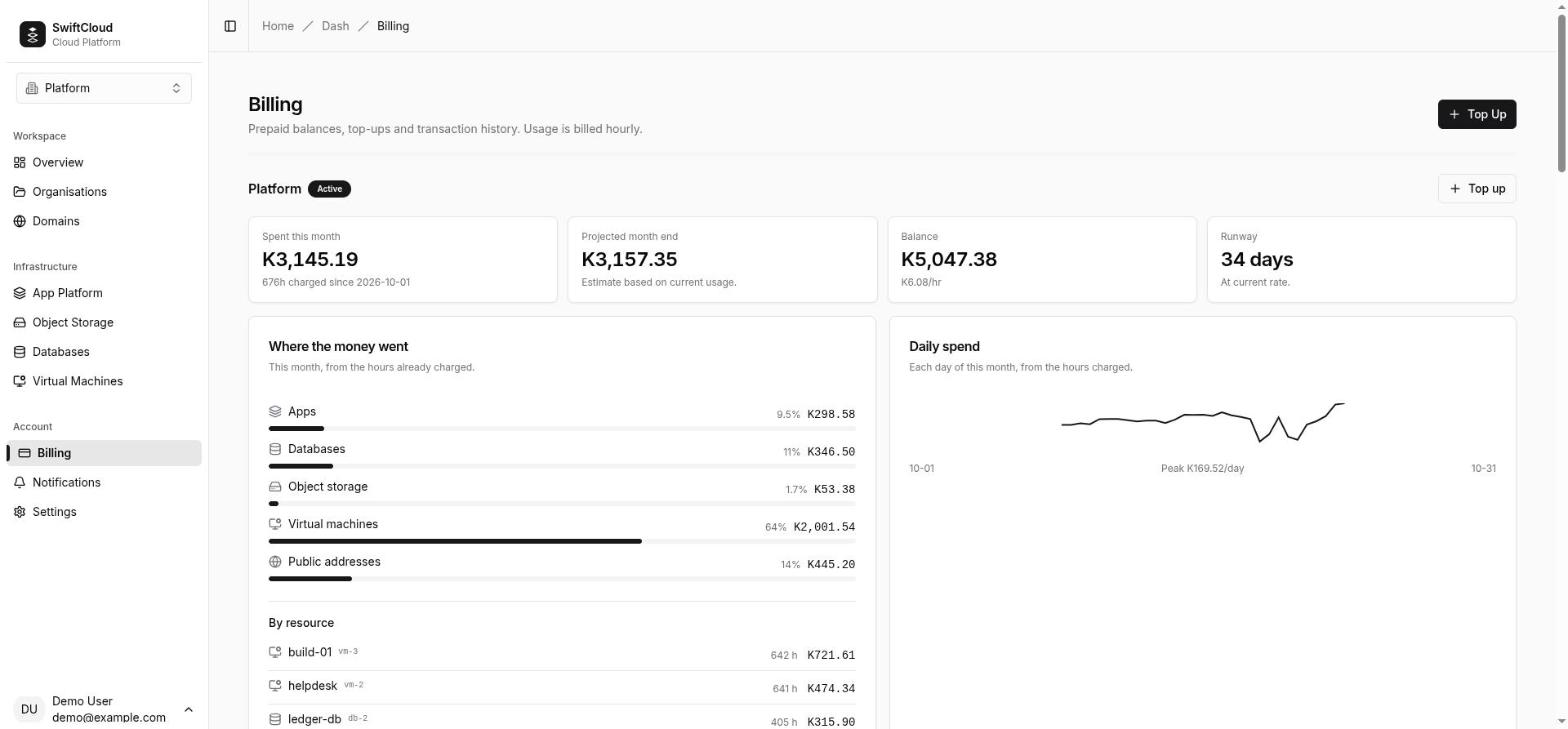
Open Billing in the console to see every organisation you belong to, each with its balance, what it is spending and how long that balance will last.
The balance can go below zero. That only happens during the grace period
described in Running out, when resources keep running after the
money has run out; the badge beside the organisation then reads Negative. A
balance under K5 reads Low.
How charges work
Every resource has an hourly price set by its size; the current prices are on the pricing page. At the top of every hour, UTC, the platform works out what the hour that has just ended cost, takes it from the wallet as one line, and then checks the balance.
| Product | Billed by | Running | Stopped |
|---|---|---|---|
| Apps | replica-minutes × the size's hourly rate | per replica, per minute | nothing (scaled to zero) |
| Databases | the size's hourly rate | full rate | full rate |
| Virtual machines | the size's hourly rate (+ Windows markup) | full rate | full rate |
| Dedicated public IP | an hourly address rate | while attached | while attached |
| Buckets | the size's hourly rate | full rate | — |
| Domains and DNS | free | — | — |
Apps: by the replica-minute
An app's charge follows what is actually running. Once a minute the platform counts each app's
running, ready replicas — whatever the app's status says, so an app that is deploying a new
revision, or whose new revision failed while the previous one keeps serving, pays for the
replicas that are serving; at the end of the hour it adds those counts up into replica-minutes, divides
by 60 and multiplies by the app size's hourly rate. An app awake for ten minutes on one replica
pays one sixth of an hour; an app scaled to zero for the whole hour pays K0.00. An app with a minimum of one or more replicas never scales to zero, so it
pays for those replicas around the clock. The App Platform guide works through an example hour.
Databases, machines and buckets: what they reserve
These are charged for what they hold, and they hold it whether or not they are running. A stopped database keeps its disk and its size; a stopped virtual machine keeps its disk, its size and its address. So stopping one changes nothing on the bill — it keeps its full hourly price until you delete it. A bucket is priced by its size tier, not by how much you have stored in it.
Dedicated public IPs
A dedicated public IP attached to a virtual machine is its own line on the bill, named after the machine (for example web — dedicated address), charged every hour it is attached, whether the machine is running or not. Detach it to stop the charge.
Windows machines
A Windows virtual machine costs its Linux price plus a platform markup set per market: either a fixed amount per month (spread over a 730-hour month and charged hourly) or a percentage of the Linux price. The markup is a platform charge for running Windows guests, not a Windows licence — you bring your own licence. The pricing page and the create form show the Windows price in full.
When billing starts and stops
- Databases, machines and buckets are charged a full hour at every hourly mark at which they exist and are usable — including a database shown as Degraded, which is running and holds its full size. There is no part-hour charging: a database that became ready at 14:50 pays a full hour at 15:00; one deleted at 14:55 pays nothing for that hour.
- Anything still being created, or that failed to be created, is not charged — it holds nothing you can use.
- Apps are charged only for the minutes their replicas actually ran.
- Deleting a resource stops its charge from the next hourly mark. Nothing that is deleted is ever charged again.
Adding funds
Top up from Billing → Top up (or the Top up button beside an organisation, or the step on the dashboard's getting-started panel). Only an organisation's owners and admins can pay into it.
- Choose the organisation to fund and the amount in Kwacha.
The minimum is
K1and the most a single top-up can be isK500,000. - Choose a payment method. The list shows only methods that are available right now; if none are, you can still redeem a coupon.
- Select Pay. Depending on the method you either approve a prompt on your phone or complete payment on the provider's page, and land on a waiting page that follows the payment until it is settled.
Mobile money
Enter the mobile number to charge and its network (MTN, Airtel
or Zamtel). Any usual form of the number works — 0977123456, 977123456, +260 97 712 3456 — and it is stored in the national
form. The network is guessed from the prefix (096/076 MTN, 097/077 Airtel, 095/075 Zamtel); because
numbers can move between networks, a mismatch is a warning rather than an error, and you can
change the network.
A payment prompt appears on that phone. Approve it with your mobile-money PIN; the waiting page moves on by itself once the operator confirms. If the provider rejects the payment (for example for insufficient funds or a wrong number) its reason is shown so you can fix it and try again.
Card (hosted checkout)
The card option sends you to the payment provider's own checkout page, where you can pay by card (and, depending on what the provider offers, mobile money). SwiftCloud never sees your card details. When you finish, you are returned to the waiting page.
Coupons
A coupon is a code worth a fixed amount of wallet credit. Enter it under or redeem a coupon in the top-up dialog and select Redeem; the credit appears immediately as a Coupon redemption line. Each coupon can be redeemed once per organisation, and a code can expire or run out of uses — the message tells you which. Like a top-up, redeeming a coupon needs the owner or admin role.
The waiting page and payment statuses
The waiting page at /dash/billing/payment/<reference> checks the payment every
few seconds (less often after the first minute) and updates on its own. Keep the reference it
shows if you contact support.
Money is credited only after the platform asks the provider for the payment's real status; a browser redirect or an unsolicited message from the provider is never taken as proof. If you close the page, nothing is lost: a background check every five minutes keeps verifying open payments for up to 48 hours.
| Status | What it means |
|---|---|
| Waiting for payment | Approve the prompt or finish the checkout. Nothing has been credited yet. |
| Payment received | Verified and credited. Suspended resources are being restored. |
| Payment failed | The provider declined it. No money left your account. |
| Payment expired | Never completed within 48 hours, so it was closed. No money left your account; start a new top-up. |
| Payment reversed | The provider took a completed payment back, so the credit has been removed again (a Refund line in the ledger). |
| Payment needs review | The amount or currency collected did not match the request, or the provider never gave a clear answer. Nothing is credited automatically; contact support with the reference. |
Payments that have not completed are listed at the top of the transaction history on the Billing page, so you can always find one you are waiting for.
What needs a balance
- Creating an app, database, virtual machine or bucket, restoring a database
backup into a new database, or attaching a dedicated public IP needs a balance that covers
about a month (730 hours) of that resource's own price — for an app, at its maximum replicas;
for a Windows machine, with the Windows charge. The rule is the same in the console, the CLI
and the API, and a refusal names the shortfall (the API answers
402billing-blocked). What you already run is not counted against it. - Adding a domain is free and works at any balance, unless the organisation is suspended.
- Stopping and deleting are never blocked — they only reduce what you spend.
- While the organisation is suspended, anything that would start spending again is refused: starting or restarting databases and machines, deploying or scaling apps, adding bucket access keys and changing bucket settings. The console and CLI say the organisation is suspended and that a top-up restores service.
VAT
Prices include VAT at your market's rate — 16% in Zambia. The hourly figure on the pricing page is the hourly figure taken from your wallet; nothing is added on top. Each hourly line records the tax within it, and the monthly statement shows the month's total split into the amount before tax and the VAT, with the platform's VAT number, so it can support your own return.
Reading your bill
For each organisation, the Billing page shows:
- Spent this month — the sum of the hours already charged since the 1st (UTC), read from the ledger, with the number of hours charged.
- Projected month end — what the month will come to if today's rate of spend holds. An estimate, labelled as one.
- Balance — with the current hourly rate under it.
- Runway — how long the balance lasts at the current rate, in days (or hours when under a day). Nothing running means nothing is costing money right now.
Spend breakdown and daily spend
The spend breakdown splits the month so far by product (apps, databases, object storage, virtual machines, public addresses) and by resource, so you can see which of your things cost money. Resources keep their name in the breakdown even after they are deleted. The daily spend chart shows each day of the month, quiet days included.
Transaction history
The ledger of every organisation you belong to, newest first, paged. Filter by Usage, Top-ups (payments and coupons) or Other (refunds and adjustments). Group by day (on by default) folds a day's hourly charges into one line per organisation; turn it off for the hour-by-hour audit trail. Each hourly line is labelled with the UTC hour it was settled at — the line for 15:00 UTC is the hour from 14:00 to 15:00 — and lists what was billed, for example 2 apps (0.5 replicas) · 1 database.
Monthly statements
On the 1st of each month, at 02:00 UTC, the platform emails a statement for the month that has just closed to every owner and admin of the organisation. It shows the total charged, split into the amount before tax and VAT at the rate in force, the platform's VAT number, spend by product and by resource (with hours), the month's top-ups and the closing balance. Times are shown in each recipient's own time zone (see Settings).
An organisation with no charges and no top-ups in the month gets no statement. Statements are sent by email; the console's ledger is the running record between them.
Each payment also gets a receipt email once it is verified and credited: it goes to the person who paid and to the organisation's owners and admins, once per settled payment, with the amount, the new balance, the payment method and the reference. Coupons do not send a receipt; their ledger line is the record.
Running low
The platform watches runway — time, not a fixed amount — because the same balance lasts very differently for one bucket and for four machines. When the current rate of spend leaves less than 72 hours of balance, owners and admins get a low balance email with the balance and roughly how many hours it will last. It is repeated at most once every 24 hours while the runway stays short, and re-armed as soon as a top-up lifts it above 72 hours.
In the console, the Billing page shows a notice when the runway is under seven days, and the organisation page shows the runway in the danger colour under 72 hours.
Running out
The balance is checked after every hourly charge and straight after every top-up. When it
reaches K0 or below, the organisation moves through three stages. Times are
counted from the hourly check that noticed each change.
1. Grace period — 72 hours
Owners and admins are emailed that the balance is empty. Everything keeps running and keeps being charged, so the balance goes negative. New billable resources are refused. The Billing page says the grace period has started and when.
2. Suspension — up to 21 days
When the grace period ends, the organisation is suspended and owners and admins are emailed:
- apps are taken offline (their settings are kept) — including one that is mid-deploy, or whose new revision failed while the previous one was still serving;
- databases are stopped (their data is kept) — whether Ready, Degraded, Starting or Restarting;
- virtual machines are halted (their disks and addresses are kept) — including ones that were starting, restarting or stopping;
- buckets are suspended (their objects are kept) and lose access at once: access keys, uploads, downloads and pre-signed links stop working, and public access is lifted for the suspension.
In short, everything that would otherwise be charged is halted, and a suspended organisation is not charged for anything, including resources you had already stopped yourself. A reminder with the deletion date is emailed every 48 hours. Domains are unaffected: the name servers keep answering for your zones throughout.
3. Deletion — after 21 days suspended
Twenty-one days after suspension, every app, database, virtual machine and bucket in the organisation is deleted, with its data, and owners and admins get a final email. This cannot be undone. Domains and DNS zones are not deleted.
An organisation that holds nothing billable (only domains, or nothing at all) never enters these stages: there is nothing to stop and nothing to reclaim.
Recovering
Top up so that the balance is above K0. During grace or
suspension the balance is negative, so the top-up must cover what is owed plus something to
run on: at -K30, a K20 top-up leaves -K10 and nothing
changes. As soon as a verified payment or coupon lifts the balance above zero:
- apps are redeployed from their saved settings;
- databases are started again;
- virtual machines return to the state you last asked for — a machine you had stopped stays stopped;
- buckets become available again: keys work, and public access is re-applied and re-verified (if it cannot be verified, the bucket stays private and its page tells you);
- owners and admins get a service restored email.
A top-up after deletion reactivates the organisation's wallet, but nothing comes back: the email says the account was reopened, not that service was restored.
Refunds and adjustments
There are no self-service refunds of wallet balance. Two kinds of line can take money back out or correct it, and both appear in the ledger:
- Refund — a payment the provider reversed after it was credited. The platform keeps checking completed hosted-checkout payments for 24 hours and removes the credit if one is reversed.
- Adjustment — a correction made by SwiftCloud support, in either direction.
For anything else about a payment, contact support with its reference.
Who can manage billing
| Owner | Admin | Member | Viewer | |
|---|---|---|---|---|
| See the balance, spend and ledger on Billing | ✓ | ✓ | ✓ | ✓ |
| See balance and runway on the organisation page | ✓ | ✓ | — | — |
| Top up by mobile money or card | ✓ | ✓ | — | — |
| Redeem a coupon | ✓ | ✓ | — | — |
| Receive statements, payment receipts and balance emails | ✓ | ✓ | — | — |
Billing emails go only to owners and admins because each one asks someone to top up or warns about losing data — something a member or viewer cannot act on. Make sure at least one owner or admin reads their email. See roles and permissions for everything else each role can do.
Questions
I stopped my database. Why am I still being charged?
Because a stopped database still reserves its disk and size. Only deleting it ends the charge. Apps are the only product that costs less when idle.
I paid but my balance has not changed.
Open the payment from the top of the transaction history (or keep its waiting page open). If it still says Waiting for payment, the provider has not confirmed it yet — the platform keeps checking every five minutes for 48 hours. If it says Payment needs review, contact support with the reference.
Why does the runway jump around?
It is worked out from what is costing money right now. Apps that scale up and down change the rate minute by minute, so the runway moves with them.
Can I pay in another currency?
No. Wallets, prices and payments are in Zambian Kwacha. Card payments are charged in Kwacha by the provider.
Can I move balance between organisations?
No. Each organisation's wallet is its own; top up the organisation that runs the resources.