Virtual machines
A virtual machine is a full Linux or Windows server of your own, in Lusaka. Unlike an app, which runs a container the platform manages, a machine gives you the whole operating system: an administrator account, system packages, your own firewall, your own services on any port.
At a glance
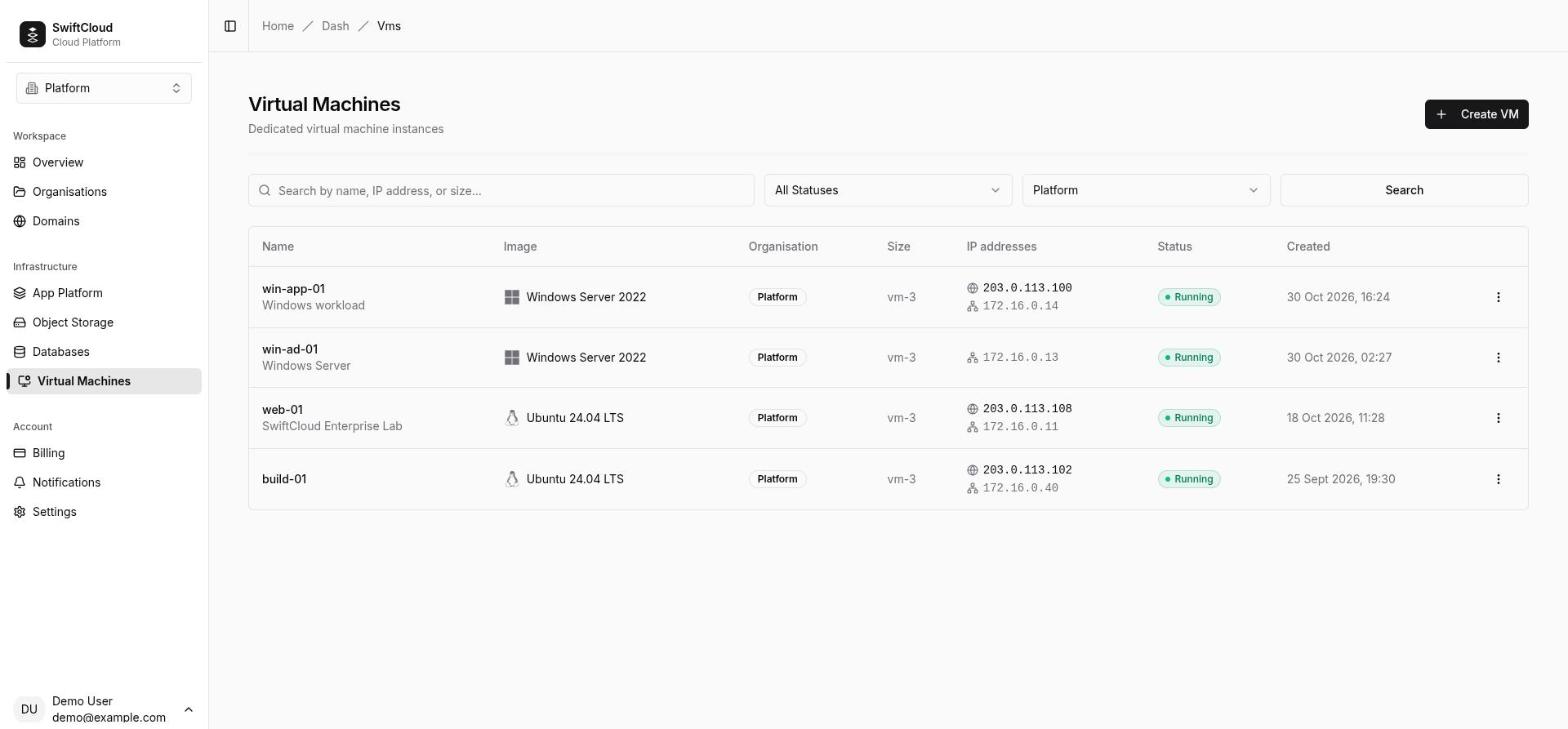
- Images — Linux distributions such as Ubuntu, Debian and Rocky Linux, and, where the region offers it, Windows Server. The list is kept up to date by SwiftCloud; the create page shows what is available today.
- Sizes — fixed plans of vCPU, memory and disk, priced by the hour (see pricing). You can move a machine to a larger plan later.
- A private network per organisation — every machine gets a private address on your organisation's own subnet. Your machines reach each other on every port; nobody else's can reach them.
- Optional dedicated public IP — the machine's own internet address: every port, the visitor's real IP, and the machine's outbound traffic leaves from it.
- Three ways in — SSH (Linux) or Remote Desktop (Windows) over the network, and a browser console with a screen view and a serial view that work even when the machine's network does not.
- Billed by the hour from your wallet, running or stopped. Only deleting a machine stops its charge.
- Region —
zm-lsk-1(Lusaka).
When to use a machine
App Platform is the right tool for most web apps and APIs. A machine is the right tool when:
- You need system-level software — a mail server, a VPN, a message broker, a monitoring agent — that does not fit inside a container.
- You need ports other than HTTPS reachable from the internet, or UDP.
- Your application expects a persistent filesystem with a particular layout.
- You need Windows, or software that has never been containerised.
- You want a bastion host to reach your other machines, or a build server you control.
Create a machine
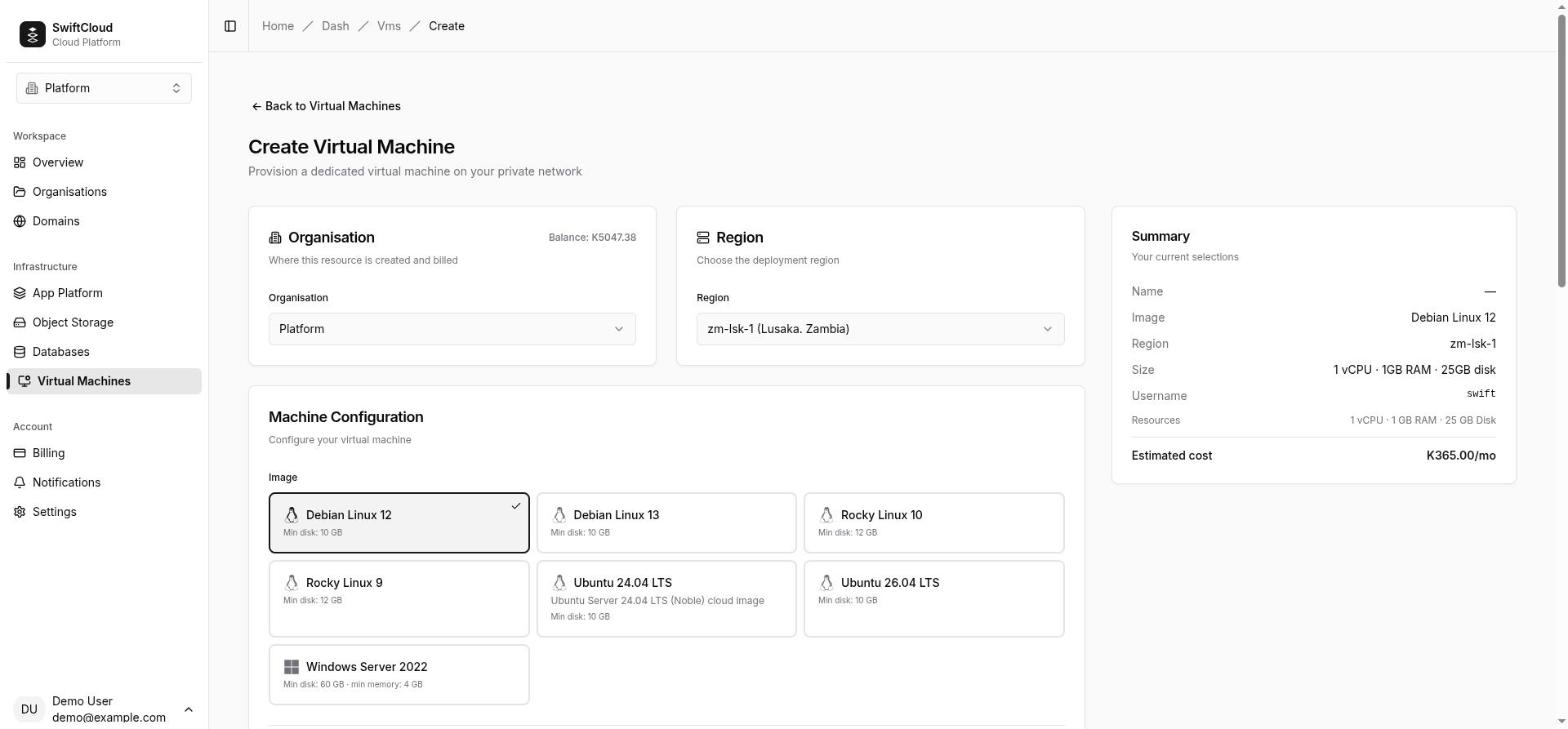
- In the console go to Virtual Machines → Create and pick the organisation and
region (
zm-lsk-1). Creating a machine needs the owner or admin role; for other roles the page says so and will not submit. - Choose an image. Each card shows the image's minimum disk and, where it is above 1 GB, its minimum memory.
- Give the machine a name (and an optional description): lowercase letters, digits and hyphens, up to 63 characters, starting and ending with a letter or digit. The name must be unique among your organisation's machines; it also becomes the machine's hostname.
- Fill in Access: the username, your SSH public keys (Linux) and a password, or leave the password blank to have one generated. See sign-in and passwords.
- Pick a size, check the estimated cost and press Create Virtual Machine.
The machine appears straight away with the status Provisioning; see what happens on first boot.
Images and their minimums
Images come from a catalogue the platform maintains. Each image declares a minimum disk and a minimum memory:
- Memory floor — sizes below the image's minimum memory are greyed out on the create page, with the reason ("… needs at least N GB of memory"), and are refused if requested any other way. Windows needs more memory than Linux.
- Disk floor — if a size's disk is smaller than the image needs, the disk is made as large as the image's minimum at no extra charge; you pay the size's price.
Sizes
A size is a fixed plan: vCPUs, memory and a root disk, at an hourly price. The create page lists every size with its hourly and monthly price (a month is counted as 730 hours), and for a Windows image the prices shown already include the Windows charge. You can move to a larger plan later — see changing the plan.
Sign-in and passwords
- Username — the account created on first boot;
swiftunless you choose another. On Linux it has passwordlesssudo; on Windows it is an administrator. - SSH public keys (Linux, optional) — one per line. They are installed for
that user on first boot and are the only way to sign in over SSH: SSH never accepts a
password. Without a key you can still sign in at the console. Keys are
installed only on first boot: a key added to the machine later (with
cloud vm ssh-key addor the API) is recorded but not installed — add it to~/.ssh/authorized_keyson the running machine yourself. - Password (optional) — at least 12 characters. On Linux it works only at the
console; on Windows it is also the Remote Desktop password. Leave it blank and a 20-character
password is generated, drawn from letters and digits with the look-alikes
(
0 O 1 l I) left out, so it is easy to type at the console.
Either way, the password is shown on the machine's Console tab to anyone whose role can use the console (owner, admin or member). It is the value set on first boot — if you change it inside the machine, the page does not know.
Windows applies its own rules on top, and the create page checks them before anything is created:
- The username must start with a letter and be at most 20 letters, digits, dots, hyphens or
underscores, and cannot be a built-in account (
Administrator,Guestand the like). - The password needs three of: upper-case letters, lower-case letters, digits and symbols, and cannot contain the username. A generated password always meets this.
- SSH keys are not used; a Windows request that includes keys is refused rather than ignored.
- The computer name is the machine name cut to 15 characters, as Windows requires.
What happens on first boot
While the status is Provisioning, the machine page shows what is going on:
- Preparing the disk — the root disk is created from the image. A progress bar shows the copy (it slides without a percentage until there is something to measure).
- Setting up OS — the image is being written to your disk.
- Starting the machine — the disk is ready and the machine boots. It becomes Running only once it is actually running, not when the request was accepted.
On first boot the machine sets its hostname, creates your user with its password and, on Linux, installs your SSH keys. A Linux machine is usually ready within minutes. A Windows machine takes several minutes more while Windows sets itself up.
If the disk is not being prepared at all, the page says Not progressing. If that lasts twenty minutes the machine is marked Failed with the reason, and the platform team is notified.
Start, stop and restart
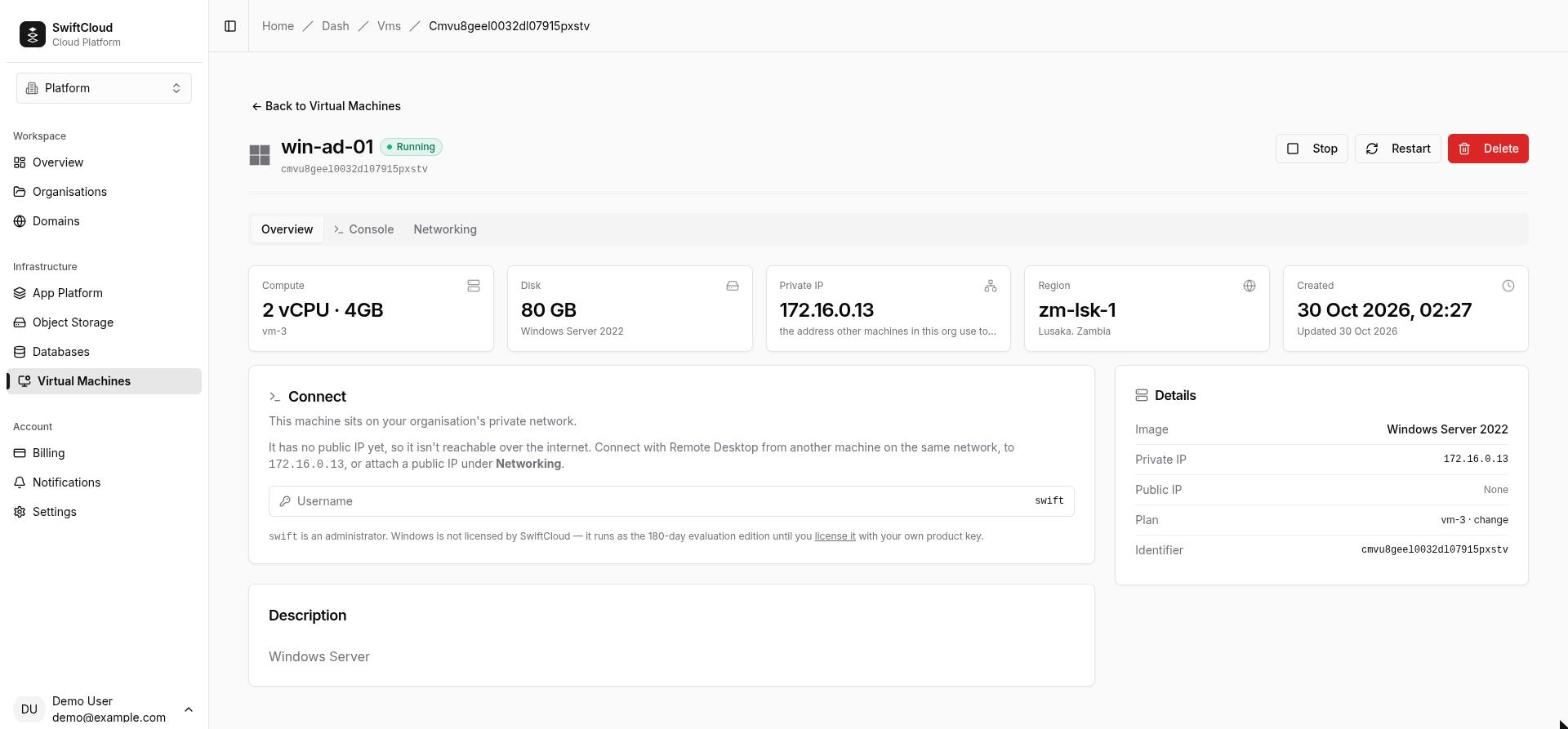
The buttons are at the top of the machine's page: Start (when stopped or failed), Stop and Restart (when running or failed).
- Stop shuts the machine down, giving the operating system the chance to stop cleanly. It keeps its disk, private address, size and any public IP.
- Start boots it again, exactly as you left it.
- Restart is a real power cycle: the machine is stopped and started again in one step. This is also when a change of public IP takes effect (a plan change restarts a running machine by itself). Restarting a machine that has already stopped starts it.
- Shutting down from inside (
sudo poweroff, or Shut down in Windows) leaves the machine Stopped; it is not started again automatically. Press Start when you want it back. A machine that crashes, by contrast, is started again.
Statuses
| Status | What it means | Charged? |
|---|---|---|
| Provisioning | Being created: disk prepared from the image, then first boot. | No |
| Starting | Booting after a Start, or after a top-up resumed it. | Yes |
| Running | Running and observed running. The console is available. | Yes |
| Restarting | Being power-cycled by Restart or a plan change. | Yes |
| Stopping | Shutting down after Stop. | Yes |
| Stopped | Off. Disk, address, size and public IP are kept. | Yes |
| Failed | Something did not complete. The reason is shown on the page; Start or Restart usually recovers it, and a machine that comes back on its own returns to Running. | No |
| Suspended | Halted because the organisation's balance ran out; a top-up resumes it. | No |
Statuses are checked against the real machine every two minutes, and the page updates live without a refresh.
Connecting to a machine
SSH (Linux)
SSH accepts keys only. From the internet you need a dedicated public IP:
ssh swift@203.0.113.20From another machine in your organisation, use the private address shown on the machine page
(for example ssh swift@172.16.4.10) — handy for a bastion host. The machine's own
firewall must allow port 22.
Remote Desktop (Windows)
Remote Desktop is switched on for the account you created. Connect any Remote Desktop client to the machine's dedicated public IP on port 3389 — or to its private address from another machine in your organisation — and sign in with the username and the password from the Console tab. Remote Desktop is the better everyday choice (sharper, with clipboard and sound); the console is there when it is not available.
The web console
The Console tab on the machine page opens a console in your browser. It needs no public IP and no client software, and it does not use the machine's network, so it still works when the firewall or network configuration is broken. It has two views:
- Screen — the machine's display, keyboard and mouse, as if you were sitting in front of it. The toolbar has Ctrl+Alt+Del (the Windows sign-in key), type text (the screen has no clipboard, so this is how you enter a password), fit to window, full screen and reconnect.
- Serial — a text terminal on the machine's serial port. On Linux it is a login prompt (sign in with the username and console password); on Windows it is the text-mode administration console, for when the desktop itself is stuck.
Windows machines open on the screen view and Linux machines on the serial view; switch either way. To sign in to Windows on the screen: press Ctrl+Alt+Del on the toolbar, then use type text to enter the password.
- The console appears only while the machine is running, and opens by itself once it is.
- It needs a role that can change the machine: owner, admin or member. Viewers cannot open it and are not shown the password.
cloud vm console <name>opens a full-window serial console in your browser; you need to be signed in to the console there.
The private network
The first machine you create in a region gives your organisation its own subnet there — a /24 from 172.16.0.0/12, for example 172.16.4.0/24. Every
machine gets the next free address from .10 upwards; .1 is the
gateway. The address on the machine page is the real one: ip addr inside the guest
shows the same.
- Machines in the same organisation and region reach each other on every port, by private address.
- No other organisation can reach your subnet, and your machines cannot reach theirs.
- Machines can reach the internet. Without a dedicated IP, their outbound traffic leaves from a shared address and nothing on the internet can connect in.
- Managed databases and object storage are not on this network. Connect to them with the connection details on their own pages, exactly as from anywhere else.
- A machine keeps its private address when stopped, started, restarted or moved for maintenance.
Getting traffic to a machine from the internet
Machines are private by default: they can reach out, but nothing from the internet can reach them. To serve anything to the internet, attach a dedicated public IP.
Dedicated public IP
A dedicated IP is an IPv4 address that belongs to one machine:
- Every port on the address reaches the machine, TCP and UDP — no per-port setup.
- Real client IPs: connections arrive from the visitor's own address, for logs, rate limits and allow-lists.
- Egress: all of the machine's outbound traffic leaves from this address, so it is a stable address to give to others' allow-lists.
To attach: open the machine's Networking tab, press Attach a public address, then Attach dedicated IP. The
platform picks the address; you cannot choose one. Attaching adds an hourly charge, so it needs
the owner or admin role (members do not see the button);
releasing can be done by members too. From the CLI: cloud vm ip attach <name>.
It takes effect on the machine's next start. The address is bound to the machine's definition straight away, but a running machine only starts answering on it after a restart — the Networking tab says Bound — takes effect on the next restart and offers Restart now. A stopped machine is live on it when it next starts. Until then the Public IP field reads Being assigned… while the address is pending.
To release: Release address on the Networking tab, or cloud vm ip detach <name>. On a stopped machine the address goes back to the
region's pool at once. On a running machine the binding is removed now, but the machine may keep
answering on the address until it restarts; the address returns to the pool once the restarted
machine is running. Anything pointing at it — DNS records, client configuration — breaks then,
and a later attach may get a different address.
- Supply is limited. If none is free, the attach is refused with "There are no public addresses free in this region right now. Nothing was changed." — try later or contact support.
- One public IP per machine.
- The platform checks every dedicated IP from the outside every minute, and its team acts on what it finds. To check a port yourself, use the port reachability tool (signed in, your own addresses only).
- During maintenance on the region's network edge the address can pause briefly while the machine itself keeps running.
- To give the machine a name, add an
Arecord pointing at the address — see Domains & DNS.
Windows
Everything above applies to Windows machines, with these differences:
- The account you name (default
swift) is an administrator, Remote Desktop is on, and you sign in with the password — see the Windows rules. SSH keys are not used, and adding one is refused. - Windows needs more memory and disk than Linux: smaller sizes are greyed out, and a too-small disk is enlarged at no extra charge.
- The first start takes several minutes while Windows sets itself up.
- The console opens on the screen view: press Ctrl+Alt+Del on its toolbar, then use type text for the password. Its serial view offers the Windows text-mode administration console.
Licensing and the Windows charge
SwiftCloud does not sell Windows licences, and the price of a machine does not include one. Windows machines start as the evaluation edition of Windows Server, which runs for 180 days. After that it shuts itself down every hour until it is licensed.
To license a machine, convert it to the full edition with your own product key, from an administrator prompt, then restart when asked:
# Standard; use ServerDatacenter for a Datacenter key
DISM /online /Set-Edition:ServerStandard /ProductKey:XXXXX-XXXXX-XXXXX-XXXXX-XXXXX /AcceptEula
The key must match the edition you convert to. slmgr /ipk on its own is not
enough: an evaluation edition refuses a full key until it has been converted. DISM /online /Get-TargetEditions lists the editions a machine can become.
You are responsible for being licensed to run Windows Server on a hosted cloud. Not every licence allows it — check your agreement, or ask whoever sold you the licence, before you rely on it.
Changing the plan
On the machine's Overview tab, press the plan name (· change), pick a larger plan and press Save plan.
- Owner or admin only. A bigger plan changes what the organisation pays, so members and viewers see the plan without the change link. It is also refused while the organisation is suspended or its balance is empty — top up first.
- Upgrades only. Plans at or below the current one are marked (current or lower) and refused; a plan below the image's memory floor is refused too.
- A running machine is restarted automatically with the new vCPUs and memory, and its disk is enlarged. A stopped machine is not started: it gets the new size the next time you start it. Disks only grow, never shrink. Ubuntu grows its root filesystem into the new space on boot; if Windows does not show the extra space, extend the C: volume in Disk Management.
- The new price applies from the next billing hour.
- Wait for any start, stop or restart to finish first; a plan change is refused mid-operation.
- There is no plan change from the CLI or API yet.
Maintenance and live migration
The platform can move a running machine to another server for maintenance without stopping it. The machine keeps running, keeps its private address and its public IP, and its network switches over in well under a second. Routine infrastructure work does not need your machines to stop.
The disk is replicated across several servers in the region, so a single hardware failure does not lose it. There are no machine snapshots or backups today — back up what matters from inside the machine.
Billing
- A machine is charged by the hour from your organisation's wallet, at its size's price (plus the Windows charge for Windows).
- Running or stopped costs the same: a stopped machine still holds its disk, address and size. Only deleting it stops the charge.
- It is not charged while Provisioning, while Failed, or while Suspended.
- A dedicated public IP has its own hourly price (see pricing), charged while it is attached — whether the machine runs or not — and until a released address is back in the pool.
- A plan change is charged at the new price from the next hour.
- If the balance runs out, the organisation gets a grace period, then its machines are halted (Suspended) and, if it stays unpaid, deleted. See running out.
Limits
- Each organisation can have a limited number of machines (three by default). Past it, creating one fails with "Virtual machine limit reached"; contact support to raise it.
- Up to 245 machines fit in an organisation's private subnet in a region.
- One dedicated public IP per machine, IPv4 only, from a limited regional supply.
- Names: lowercase letters, digits and hyphens, up to 63 characters, starting and ending with a letter or digit — the same rule in the console, the CLI and the API.
- If the region cannot fit another machine right now, creating one fails with "This machine could not be created right now. Please try again shortly, or contact support if it keeps happening."
Delete
Press Delete on the machine page and type the machine's name to confirm, or run cloud vm delete <name>. Deleting removes the machine and its disk, returns any
public IP to the pool and stops all charges. There is no undo. Only owners and admins can delete.
- The name can be used again straight away.
- The private address is held back for 30 days before another new machine can be given it, so stale references do not reach a stranger machine.
- If the disk is still syncing (for example just after maintenance), deletion is refused with "This machine's disk is still syncing…" — wait a few minutes and delete again.
Who can do what
| Action | Roles |
|---|---|
| See machines and their details | Owner, admin, member, viewer |
| Start, stop, restart; release a public IP; add or remove SSH keys | Owner, admin, member |
| Open the console and see the password | Owner, admin, member |
| Attach a dedicated public IP; change the plan (both raise what the organisation pays) | Owner, admin |
| Create and delete machines | Owner, admin |
CLI and API
Every command takes the machine's name. The organisation comes from --org, CLOUD_ORG or your context; see the CLI guide.
cloud vm list
cloud vm create web --image ubuntu-24-04 --size vm-1 --region zm-lsk-1 --wait
cloud vm create web --image ubuntu-24-04 --size vm-1 --ssh-key ~/.ssh/id_ed25519.pub
cloud vm get web                       # status, image, size, private and public IP, reason if failed
cloud vm start|stop|restart web [--wait]
cloud vm console web                   # opens the serial console in your browser
cloud vm ip get web
cloud vm ip attach web                 # dedicated public IP; restart to bring it live
cloud vm ip detach web [--yes]
cloud vm ssh-key list web
cloud vm ssh-key add web ~/.ssh/id_ed25519.pub [--label laptop]
cloud vm ssh-key remove web <key-id> [--yes]
cloud vm delete web [--yes]--waitblocks until the machine reaches Running, Stopped, Suspended or Failed (default timeout 10 minutes, change with--timeout).- A machine created from the CLI or API uses the username
swiftand a generated password; read it from the machine's Console tab in the web console. It takes one SSH key, installed on first boot. Without--size(orsizein the API) it gets the smallest size the image fits on. cloud vm ssh-key addandremovechange the machine's key list — a record, not the machine itself. Keys are installed inside the machine on first boot only, so on a machine that is already running, also add (or remove) the key in~/.ssh/authorized_keysyourself. The API's answer to an added key carries anoticesaying exactly this, and the machine's page counts the keys on record.
The same operations are in the public API, under /api/v1/orgs/{org}/vms ({vm} is the machine's name or id). The full description is at /api/v1/openapi.json; authenticate with an API token.
| Request | Does |
|---|---|
GET /vms | List machines |
POST /vms | Create: name, image, region, optional size, description, sshPublicKey |
GET /vms/{vm}, DELETE /vms/{vm} | Show, delete |
POST /vms/{vm}/start, /stop, /restart | Power operations (202 Accepted; poll the status) |
GET /vms/{vm}/ip | Private and public address |
POST /vms/{vm}/ip/attach, /ip/detach | Attach or release a dedicated IP |
GET, POST /vms/{vm}/ssh-keys; DELETE /vms/{vm}/ssh-keys/{keyId} | The machine's SSH key list |
The console, the password and plan changes are in the web console only.
Troubleshooting
- Provisioning is taking a long time
- The machine page shows the disk progress. Copying an image can take several minutes, and Windows several more on first boot. If it says Not progressing for twenty minutes it becomes Failed and the platform team is notified; delete it and create it again, or contact support with the reason shown.
- I cannot SSH in
- From the internet you need a dedicated IP, and the machine must have been restarted since you attached it (the Networking tab says so if not). SSH takes keys only — a password will not work. Check the guest's firewall allows port 22, and test with the port reachability tool. The serial console works regardless.
- The console is not there
- It appears only while the machine is Running, and only for owners, admins and members. If the machine is stopped, press Start and the console appears by itself.
- My password does not work at the console
- Use the username and password on the Console tab. If you changed the password inside the machine, the page still shows the original. On the screen view, type it with type text — pasting does not reach the machine.
- The machine is Stopped but I did not stop it
- It was shut down from inside the operating system. Press Start.
- The machine is Failed
- Read the reason on the page, then try Start or Restart. If it fails again, contact support and quote any reference code in the message.
- The public IP does not answer
- Restart the machine if the Networking tab says the address takes effect on the next restart.
Then check the guest's firewall and that your service listens on all addresses, not only
127.0.0.1. - Creating a machine says the balance is insufficient
- Top up the organisation's wallet; the error links straight to it.