Domains & DNS
DNS turns example.co.zm into the address a browser or mail server connects to.
SwiftCloud can answer DNS for your domain, so you manage the records for your apps, buckets,
machines and email in the same place as the resources themselves.
At a glance
- DNS hosting, not registration. You keep the domain with your registrar and point its name servers at SwiftCloud's.
- Nine record types:
A,AAAA,CNAME,MX,TXT,NS,SRV,CAAandPTR, each checked before it is written. - What you see is what resolves. A record is saved only after the name servers accept it, and the list is reconciled with them every hour.
- Free. Hosting a domain's DNS has no charge.
- Console, CLI and API — add domains in the console; manage records anywhere.
How DNS hosting works
Every domain has name servers: the servers that answer DNS questions for it.
The registry for the domain's ending (.co.zm, .com …) keeps a list of
them, which you set at your registrar. When someone looks up your domain, their resolver asks
the registry which name servers to ask, then asks those for the record.
To let SwiftCloud answer, you set your domain's name servers to SwiftCloud's two. That does not transfer the domain or change where you renew it — only who answers the DNS questions.
Adding a domain
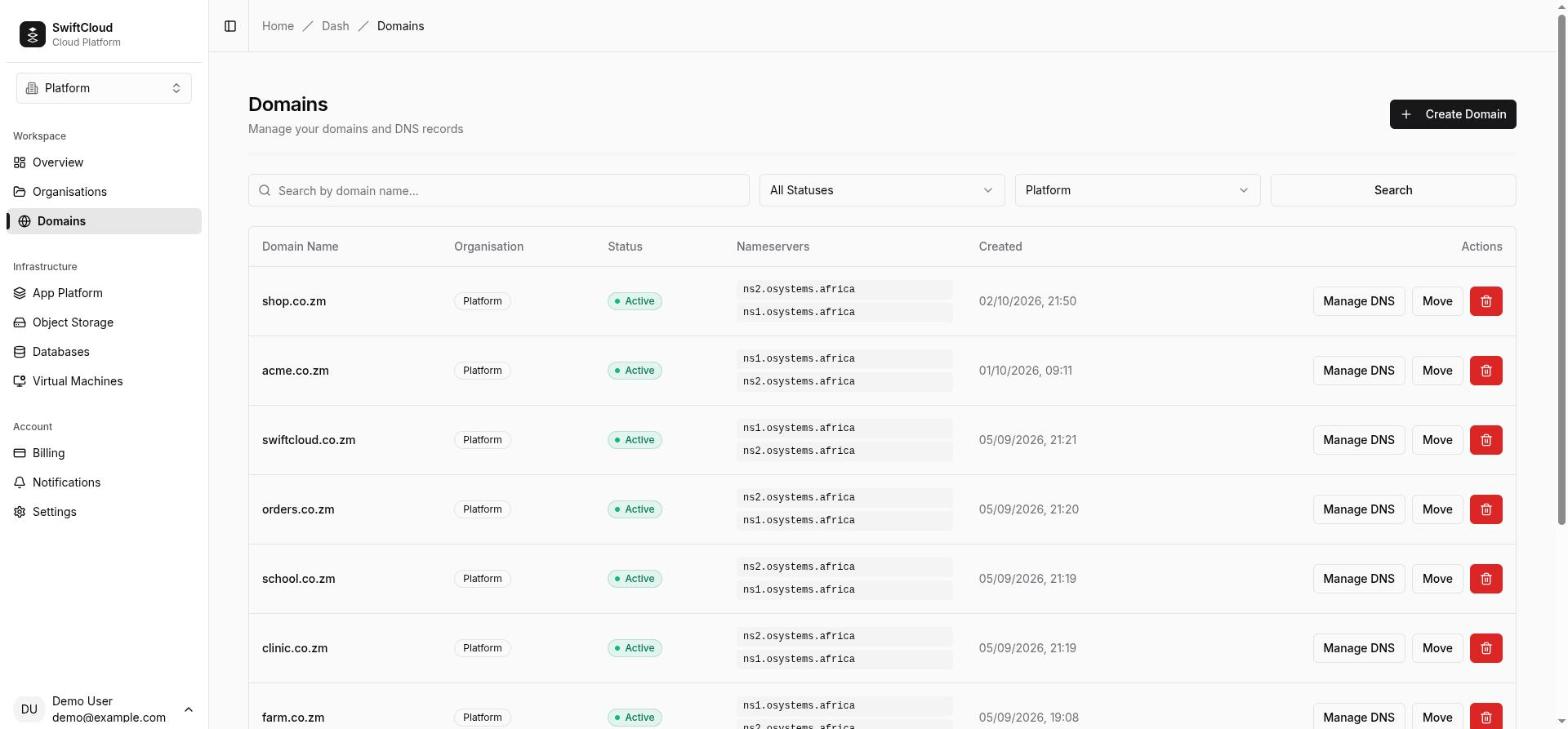
Point the name servers first: the console only adds a domain that is already using SwiftCloud's.
- In the console go to Domains → Add domain. The dialog lists the two required nameservers.
- At your registrar, set the domain's name servers to those two. Remove the old ones when you are ready to switch (see below).
- Back in the dialog, enter the domain and press Check. It passes once at least one of SwiftCloud's name servers is in the domain's delegation, and shows Domain Verified. If not, it shows Nameserver Mismatch with the current and expected name servers side by side — fix them at the registrar and check again.
- Pick the organisation and press Add. The domain's zone is created, and the domain is Active. Adding a domain needs the owner or admin role in that organisation.
The check reads the live delegation from DNS, and falls back to the registry's registration data (RDAP) where DNS does not answer. A partial switch is accepted: with one of SwiftCloud's name servers alongside an old one, the domain passes, so you can migrate gradually. Name-server changes usually show within an hour but can take up to a day, depending on the registry.
- Domain names are stored in lowercase.
- A domain can be on the platform once. If another organisation already has it, adding it is refused with "Domain already exists on the platform".
- Adding a domain is free and does not need a positive balance; a suspended organisation cannot add one.
- Each organisation can have up to 25 domains by default. At the limit, adding one is refused with "This organisation has reached its limit of 25 domains. Remove one before adding another." Contact us if you need more.
Domain statuses
After it is added, the delegation is checked again every 15 minutes. A check that cannot be completed (a lookup that fails) changes nothing.
| Status | Meaning |
|---|---|
| Active (Verified) | The domain uses SwiftCloud's name servers. Records can be added, changed and deleted. |
| Pending | The delegation verifiably no longer points at SwiftCloud (or the zone is still being set up). The console does not let you add or delete records until it is Active again, which happens by itself once the name servers are back. |
The Nameservers column shows the name servers the last check observed.
Managing records
Open a domain from the Domains list to see its records and SwiftCloud's name servers, then use Add Record, or the edit and delete actions on a row. Each record has:
- Name, relative to the domain:
@is the domain itself (the apex),wwwiswww.example.co.zm. Labels use letters, digits,-and_; a*label makes a wildcard. Typing the full name inside the domain works too and is shortened for you. - Type and Content (the value) — see below.
- TTL in seconds — see TTL.
- Priority, for
MXandSRVonly.
From the CLI, records are addressed by id, because one name can carry several records:
cloud dns list                                         # your organisation's domains
cloud dns records list example.co.zm                   # records with their ids
cloud dns records add example.co.zm --name www --type A --content 203.0.113.10
cloud dns records add example.co.zm --name @ --type MX --priority 10 --content mail.example.co.zm
cloud dns records add example.co.zm --name @ --type TXT --content "v=spf1 mx ~all"
cloud dns records update example.co.zm <record-id> --content 203.0.113.20 --ttl 300
cloud dns records remove example.co.zm <record-id> [--yes]
update changes only the fields you pass. The list shows values the way the name
servers hold them: hostnames end with a dot and TXT values are quoted.
Record types and validation
Each record is checked before it goes anywhere, and the error names exactly what is wrong.
| Type | Content | Default TTL |
|---|---|---|
A | An IPv4 address, e.g. 203.0.113.10 | 300 |
AAAA | An IPv6 address | 300 |
CNAME | A hostname. Not at the apex, and alone on its name. | 300 |
MX | A mail server hostname, with a priority (0–65535) | 3600 |
TXT | Any text; quoting is added for you | 3600 |
NS | A hostname — to delegate a subdomain elsewhere | 3600 |
SRV | <weight> <port> <target>, e.g. 5 5060 sip.example.co.zm, with a priority | 300 |
CAA | <flags> <tag> <value> with tag issue, issuewild or iodef, e.g. 0 issue "letsencrypt.org" | 3600 |
PTR | A hostname | 300 |
- CNAME rules. A
CNAMEcannot be at the apex — it would forbid the records the zone itself needs — and a name with aCNAMEcan carry nothing else (and vice versa). Both are refused with the reason. - Several values per name are fine — two
MXservers, severalAaddresses, severalTXTstrings. An exact duplicate is refused with "That record already exists." - Hostnames are stored in lowercase.
How record changes are applied
A record exists only once the name servers have accepted it. Every add, change and delete — from the console, CLI or API — goes the same way:
- It is checked as above. A problem is reported and nothing changes.
- It is written to the name servers first, merged with the values already at that name
and type, so adding a second
MXnever drops the first, and deleting one value leaves its siblings in place. - If the name servers refuse it, you get their reason ("The name servers did not accept this record: …") and nothing is saved. If they cannot be reached, nothing changes and you are asked to try again.
- Only once they accept is the record saved to your list as active.
The hourly reconcile
Every hour your record list is compared with the zone on the name servers, and the list is brought in line one difference at a time — a record missing from the zone is removed from the list, and one in the zone but not the list is added. Nothing is wiped and recreated, record ids stay stable, and a record written moments ago is given time to land. The zone's own NS records appear in the list too.
Pointing names at your resources
An app
- Add the hostname, say
www.example.co.zm, as a custom domain on the app. The app shows the CNAME target to use. - Here, add a
CNAMErecord: namewww, content the target the app showed.
The app checks that the name points at the platform before it requests a TLS certificate, so the order does not matter and nothing is wasted while DNS catches up. If your zone is hosted elsewhere, create the same record at that provider.
The bare domain (apex)
A CNAME is not allowed at @. For the bare example.co.zm,
create A records with the addresses the app's CNAME target resolves to
(dig +short <target>, or the DNS lookup tool).
Those addresses can change, so prefer www with a CNAME as the main
name where you can.
A public bucket
Attach the hostname to the bucket (see bucket domains), then add a CNAME from
that name to the bucket's own hostname, which the bucket page shows.
A virtual machine
Give the machine a dedicated public IP,
then add an A record from the name you want (for example vpn) to that
address. If you release the address later, update the record — a new attachment may get a
different address.
Add the MX records your mail provider gives you (at @, with their
priorities) and their TXT records for SPF, DKIM and DMARC.
TTL and propagation
The name servers answer with a change as soon as it is accepted. But resolvers everywhere cache answers for the record's TTL (time to live), so a change can take up to the old TTL to be seen everywhere.
- TTLs range from 60 to 86400 seconds (one day).
- Defaults: 300 seconds (five minutes) for records that point at something —
A,AAAA,CNAME,SRV,PTR— and 3600 (one hour) for records that describe the domain:MX,TXT,NS,CAA. - Records with the same name and type are one set on the name servers and share one TTL; the TTL of the last one written applies to all of them.
Moving a domain to another organisation
From the Domains list, choose Move to another organisation and pick the target. You must be an owner or admin in both organisations — the one that holds the domain and the one receiving it. The console shows the option only then, and offers only targets where you hold that role. The target's domain limit applies: a move into an organisation that already has its maximum number of domains is refused. The domain keeps its records and keeps resolving; only its owner changes.
Deleting a domain
Delete a domain from the Domains list; only owners and admins can. The zone is removed from SwiftCloud's name servers first, so its records stop being served from there, and only then is the domain removed from your organisation. If the name servers cannot be reached, the domain is kept and you are told: "The domain could not be removed from the name servers, so it was kept. Try again in a moment." Once deleted, it can be added again later. There is no undo.
Free DNS tools
The tools show what the internet sees, without an account:
- DNS lookup — query any record type for any name.
- WHOIS / RDAP — registrar, dates and name servers of a domain,
.zmincluded. - Custom domain checker — is a name pointed at the platform the way an app needs?
- HTTP & TLS inspector — fetch a URL and see its status, redirects and certificate.
Billing
Who can do what
| Action | Roles |
|---|---|
| See domains and records | Owner, admin, member, viewer |
| Change an existing record | Owner, admin, member |
| Add domains and records; delete records and domains | Owner, admin |
| Move a domain to another organisation | Owner or admin in both organisations |
CLI and API
Domains are added, moved and deleted in the console. Listing domains and everything to do with
records is also in the CLI (above) and the public API, under /api/v1/orgs/{org}/domains, where {domain} is the
domain name or id. The full description is at /api/v1/openapi.json; authenticate with an API token.
| Request | Does |
|---|---|
GET /domains | List the organisation's domains |
GET /domains/{domain}/records | List records |
POST /domains/{domain}/records | Create: name, type, content, optional ttl, priority |
PATCH /domains/{domain}/records/{recordId} | Change the fields you send |
DELETE /domains/{domain}/records/{recordId} | Delete |
A successful write means the record is live on the name servers; a refusal carries their reason. PUT is still accepted as an alias of PATCH for older CLI versions.
Troubleshooting
- Check says "Nameserver Mismatch"
- The registry still lists other name servers. Set SwiftCloud's two at your registrar and wait — usually under an hour, up to a day. The WHOIS tool shows what the registry has now.
- Check says the name servers could not be resolved
- The domain is not registered, has expired, or has no name servers yet. Check it with your registrar.
- My domain went to Pending
- A check found it no longer delegated to SwiftCloud — usually a registrar change. Restore the name servers; it returns to Active within 15 minutes of the change being visible.
- "The name servers did not accept this record"
- The reason follows the colon. Fix the value and try again; nothing was saved.
- "A CNAME cannot share a name with other records"
- Remove the other records at that name first, or use a different name. At the apex use
Arecords instead. - I changed a record but still get the old answer
- Resolvers are caching the old answer for its TTL. Query SwiftCloud's name servers directly
(
dig @<name server> www.example.co.zm) or use the DNS lookup tool to see the new value, then wait out the TTL. - A record appeared or disappeared in the list by itself
- The hourly reconcile brought the list in line with what the name servers actually hold.