Databases
A managed PostgreSQL database: you choose a version and a plan, SwiftCloud runs the server, keeps its storage, takes backups when you turn them on, and hands you a connection string. You never manage a server or log in to one.
At a glance
- Engine: PostgreSQL only. Pick a version when you create the database.
- Two ways in: a public hostname on port 5432 with TLS required, for your laptop,
CI or servers elsewhere; and a short private name such as
db-ordersfor apps in the same organisation. - Plans fix the CPU, memory and disk. You can move up to a bigger plan, not down.
- Backups are off until you turn them on. Once on, you get a daily backup plus a continuous record of every change, so you can restore to any moment in the retention window.
- Restore always creates a new database. The original is never overwritten.
- Billing: a flat hourly price for the plan, charged from your organisation's wallet. A stopped database costs the same as a running one; only deleting it stops the charge.
Use a managed database when your app needs relational storage and you would rather not run PostgreSQL yourself. If you need an engine other than PostgreSQL, or superuser access, run it on a virtual machine instead.
PostgreSQL
Every database is a single PostgreSQL server in region zm-lsk-1 (Lusaka), with
its own disk. The versions on offer come from a catalogue the platform maintains; at the time
of writing they are 17 (the default), 16 and 15. The console's version list and cloud db engines always show
the current set, with the default marked.
cloud db enginesWhat you get inside the server:
- One database named
appand one user namedapp, which owns it. The password is generated for you. Create your own schemas, tables and further roles inside it as you like. - The
appuser is the database owner, not a superuser. Extensions that PostgreSQL marks as trusted (for examplepgcrypto,citext,hstore,pg_trgm,uuid-ossp) can be added withCREATE EXTENSION; extensions that need a superuser cannot. - Up to 100 connections at once. Use a connection pool in your app rather than opening a connection per request.
- PostgreSQL's shared buffer cache is set to about a quarter of the plan's memory, and adjusts when you change plan.
- There is one server per database, with no standby copy. If it restarts, connections drop for the moment it takes to come back; backups are how you protect the data itself.
Create a database
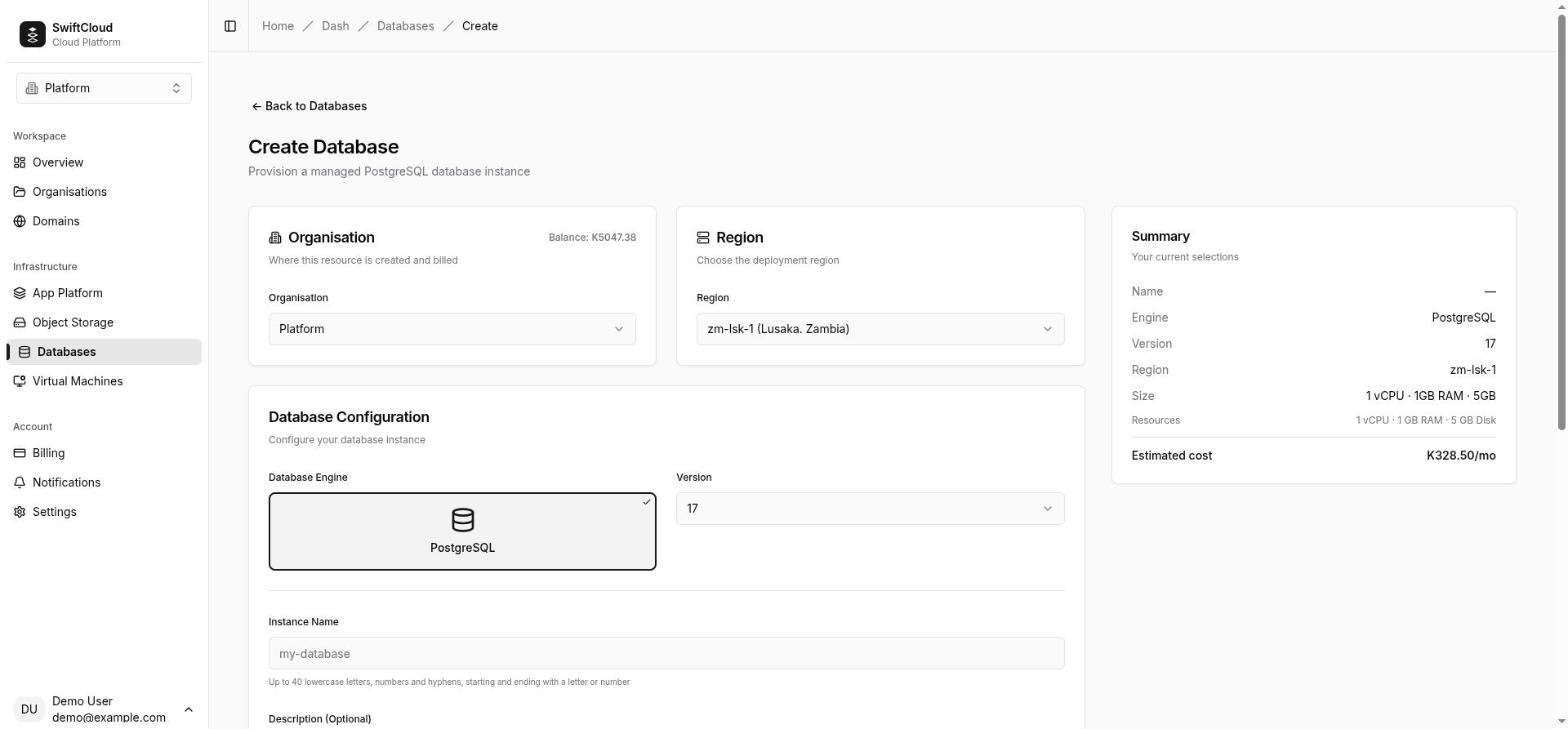
- Open Databases and click Create Database (
/dash/databases/create). - Choose the organisation that will own and pay for it, and the region (
zm-lsk-1). - Engine and version. PostgreSQL is selected; pick a version or keep the one marked Recommended.
- Instance name. Unique among the organisation's databases. Use lowercase
letters, digits and hyphens, starting and ending with a letter or digit, at most 40
characters. The console, the CLI and the API all apply this same rule, so a name like
ordersorshop-prodworks everywhere. Add an optional description. - Instance size. Each size is a plan with fixed vCPU, memory and disk, and an hourly price (see pricing). The summary shows the estimated monthly cost.
- Click Create Database. The database appears with the status Provisioning and moves to Ready on its own, usually within a few minutes. The page updates live; you can leave and come back.
The same from the CLI:
cloud db create orders --engine postgresql --wait
cloud db create orders --engine postgresql --version 16 --size db-2 --region zm-lsk-1 --wait
--engine is required. Leave out --version for the default version, --size for the smallest plan, and --region to use the region in your
CLI context or CLOUD_REGION. --wait prints each status change until
the database is ready (or fails), for up to 10 minutes by default (--timeout).
What can stop a create:
- Balance. The wallet must cover about a month (730 hours) of the chosen plan — in the console, the CLI and the API alike. If it is short the refusal says by how much, and the console links you to a top-up for the difference. Restoring a backup into a new database needs the same. A suspended organisation cannot create anything until it tops up.
- Name taken: A database named "orders" already exists in this organisation. A deleted database releases its name straight away.
- Limit reached: Database limit reached. See limits.
- Role. Creating a database starts a charge, so it needs the owner or admin role in the organisation — in the console as well as the CLI and API. The create form tells members and viewers so and keeps Create Database disabled.
Database statuses
| Status | What it means | Billed |
|---|---|---|
| Provisioning | Being created. Credentials appear once it is ready. If nothing has been built after 15 minutes it is marked Failed with Provisioning did not complete. Delete this database and create it again. | No |
| Ready | Running and reachable on its public hostname and private name. | Yes |
| Restarting | You asked for a restart; it returns to Ready when the server is back. | Yes |
| Stopped | The server is shut down; data, disk and backups are kept. Nothing can connect. | Yes |
| Starting | You started a stopped database; it becomes Ready once healthy. | Yes |
| Degraded | The server is running but has no public hostname yet. This is on the platform's side and the team is notified; you do not need to do anything. It holds the same resources as a Ready database, so it is charged like one. | Yes |
| Suspended | Your organisation ran out of funds and its grace period ended, so the server was shut down. Data is kept. Topping up brings it back to Ready. | No |
| Failed | Creation, a restore, a plan change, or a stop, start or restart did not complete. The page shows the reason. If the server is actually healthy, the next check (every two minutes) puts it back to Ready. | No |
The console updates statuses live. From the CLI, cloud db get orders shows the
current one and --wait on create, start, stop, restart and restore follows it.
Connecting
Where to find the credentials
Open the database and go to the Credentials tab. Once the database is Ready it shows:
- Host — the public hostname, unique to this database.
- Port —
5432. - Username and Password —
appand its generated password. - Connection String (public) — a ready-made
postgresql://…?sslmode=requireURI, masked until you reveal it. - Connection string for your apps — the same credentials with the private host, for apps in this organisation.
The Overview tab also has a Quick connect command that prompts for the password rather than showing it. From the CLI:
# shell variables psql reads (PGHOST, PGPORT, PGUSER, PGPASSWORD, PGDATABASE, DATABASE_URL)
eval "$(cloud db credentials orders --format env)" && psql

# just the public URI
cloud db credentials orders --format url
# postgresql://app:PASSWORD@HOST:5432/app?sslmode=require

# every field, including the private connection string for apps
cloud db credentials orders -o json
Reading credentials — in the console, the CLI or the API — needs the member role or above. A viewer can see that a database exists but not how to log in: the Credentials tab and the Quick connect command say the details are not shown to their role. Until the database is Ready, the CLI answers that the credentials are not available yet rather than printing nothing.
From your apps (private)
An app on App Platform in the same organisation reaches the database by a short private name: db- followed by the database's
name, for example db-orders, on port 5432. If two of your databases would get the
same short name, the later one gets a short suffix — always copy the exact value from the
Credentials tab.
postgresql://app:PASSWORD@db-orders:5432/appTraffic on this path never leaves the platform, so TLS is not required (the server still
offers it if your driver asks). Store the string as a secret environment variable on your app,
for example DATABASE_URL. The private name does not resolve from anywhere else —
not from your laptop, not from a virtual machine, and not from another organisation's apps.
From outside (public, TLS)
Everything else — your laptop, a CI runner, a virtual machine, a server at another provider — uses the public hostname on port 5432. TLS is mandatory on this path: the public endpoint uses the hostname your client sends in the TLS handshake to find your database, so a connection without TLS has no way to reach it. The encrypted connection is passed straight through to your database, which ends the TLS session itself.
psql "postgresql://app:PASSWORD@HOST:5432/app?sslmode=require"
psql -h HOST -p 5432 -U app -d app        # with PGSSLMODE=require in the environment
SSL modes
sslmode=require— use this on the public hostname. The connection is encrypted.sslmode=verify-ca/verify-full— not supported. The server's certificate is issued by the database's own private authority and named for its internal address, not the public hostname, so verification fails.sslmode=disable— fails on the public hostname. Fine (but unnecessary to set) on the private name.prefer/allow— work, but say what you mean: userequire.
Your client must send the hostname during the TLS handshake. Clients built on libpq 14 or
later do this by default (the sslsni setting); older clients and some drivers do
not, and their connections are closed before login — see troubleshooting. In drivers that take options instead of a URI,
set SSL on without certificate verification (for example ssl: { rejectUnauthorized: false } in node-postgres).
Rotating credentials
There is no rotate-password action today in the console, CLI or API. The password shown on the Credentials tab is the one the platform generated, and the console, the CLI and the SQL editor all read that stored value.
You can create additional roles of your own inside the database (the app user owns
it) and give each application its own login. Those you can rotate yourself whenever you like.
The SQL editor
SQL Editor in the console (/dash/sql-editor) runs queries from
your browser, with nothing to install.
- Keep the SwiftCloud Databases mode, choose your database from the Database list (each entry shows its organisation) and click Connect. The editor runs a test query and shows Connected. From a database's Overview tab, Or run queries in the browser with the SQL editor opens the editor with that database already chosen.
- Type SQL and click Execute Query (or press Ctrl+Enter). Rows appear in a table below.
- The editor connects as the
appuser to theappdatabase, over the same public TLS path you would use. The database must be Ready. - Running SQL needs the member role or above, the same as reading the credentials: the editor reads and writes every row. The list shows only PostgreSQL databases in organisations where you have that role; databases where you are a viewer are left out.
- Each run is its own session: a transaction opened in one run is gone by the next. Put
BEGIN … COMMITin a single run. - The query runs exactly as written. The Limit field (100 by default, up to
10,000) caps how many rows are sent back to your browser; when a result had more, the editor
says Showing the first … of … rows. The limit does not change your query, so the
server still does the full work — add a
LIMITto largeSELECTs yourself.
External Databases mode connects to a PostgreSQL or MySQL server elsewhere from a host, port, database name, username and password. The connection uses TLS whenever the server offers it (the certificate is not verified) and falls back to plain text only when the server offers no TLS at all. Only hosts on the public internet can be reached: a name that resolves to a private or internal address is refused with Only databases on the public internet can be reached from the SQL editor. For your own SwiftCloud databases, use SwiftCloud mode.
Start, stop, restart
In the console, the buttons are at the top of the database's page: Stop and Restart while it is running, Start once it is stopped.
- Restart drops every connection and brings the server back with the same data. Use it when the database is stuck or after heavy changes. It works only while the database is running (Ready or Degraded): a stopped database is refused with This database is stopped. Start it instead of restarting it.
- Stop shuts the server down. Data, disk, backups and credentials are kept; nothing can connect until you start it again. The console asks you to confirm, and reminds you that a stopped database keeps its storage and plan and is charged as before.
- Start brings a stopped database back through Starting to Ready, with its data exactly as it was.
cloud db stop orders --wait       # Stopped
cloud db start orders --wait      # Starting → Ready
cloud db restart orders --wait    # Restarting → Ready
These need the member role or above; viewers do not see the buttons. A suspended organisation cannot start or restart databases until it tops up.
Changing the plan
A plan sets the database's vCPU, memory and disk. To move to a bigger one: open the database, and on the Overview tab, in Details, click the plan name (… · change), choose a plan and click Save plan.
- Owner or admin only. A bigger plan changes what the organisation pays, so members and viewers see the plan but cannot change it.
- Upgrades only. Smaller or equal plans are marked (current or lower) and refused with You can only upgrade your plan, not downgrade. Disks only grow.
- The new CPU and memory are applied straight away with a brief restart, so open connections drop for a few seconds. The disk grows while the database keeps running.
- The new price applies from the next billing hour.
- If the change cannot be applied, the database shows Failed with The plan could not be applied; contact support.
Changing plan is a console action; the CLI and API do not offer it yet. If you need a smaller
plan, create a new database on it and copy the data across (for example with pg_dump and pg_restore).
Backups
Backups are off when a database is created. Turning them on starts two things:
- A daily base backup — a full copy of the database, taken at 02:00 (UTC) every day.
- A continuous archive — every change is saved as it happens, so the database can be rebuilt as it was at any moment, not only at 02:00.
Both are kept for a retention window: 3 days unless you choose otherwise. Retention is a span of time, not a number of backups — with a daily backup, a 3-day window holds two or three base backups and every change between them. Backups are stored in the same region as the database.
In the console
Open the database and go to the Backups tab.
- Enable backups turns on the daily backup and the archive with the 3-day window.
- Back up now takes an extra base backup immediately. It shows as running, then completed (or failed).
- Delete (the bin icon beside a finished backup) removes that backup for good: it is no longer listed or offered for restore, and its stored files are cleared when the retention window passes. A backup that is still running cannot be deleted. Deleting a backup needs the owner or admin role.
- Turn off backups asks for confirmation, then stops the daily backup and the archive. Backups already taken are kept and can still be restored — but only to the moment each one completed, not to any point in between. You can still back up by hand, and turn backups on again at any time.
The tab reads whether backups are on from the database itself. If it cannot check just then, it
says so and shows neither button rather than guessing. If it warns that scheduled backups are
running but continuous archiving is not attached, point-in-time recovery is not available:
press Turn archiving back on in the warning, or run cloud db backup enable <name> (both are safe to repeat and keep existing
backups).
Turning backups on or off and taking a backup need the member role or above; restoring and deleting a backup need owner or admin. Viewers can see the list.
From the CLI
cloud db backup enable orders                  # daily backup + archive, 3-day window
cloud db backup enable orders --retention 7d   # or 2w, 1m — run again to change the window
cloud db backup create orders                  # take a base backup now
cloud db backup list orders                    # newest first, with status
cloud db backup disable orders                 # stop automatic backups; ones taken are kept
--retention is a whole number followed by d (days), w (weeks) or m (months). The console always uses 3 days; choose a different window
from the CLI or API. Turning backups off keeps the backups already taken; the API equivalent is POST …/backups/disable.
Restore
A restore always creates a new database from the backups, and leaves the original running and untouched. If the original is still taking writes, overwriting it would lose exactly the data the restore was meant to save — so you get two databases, with different connection details, and choose when to move your app across.
- Open the database you want to recover, go to Backups and click Restore.
- Give the new database a name (it suggests
<name>-restored). - Optionally pick a point in time in your browser's local time. Leave it blank to restore the most recent state the backups hold. The time must be after the end of the oldest completed backup and not in the future; anything else is refused with the reason (for a time that is too early, the earliest time you can use).
- Click Create restored database. You are taken to the new database, which goes through Provisioning to Ready like any other.
- Check the data, then point your app at the new database's credentials. Delete the old one when you no longer need it.
cloud db restore orders --to orders-recovered --wait
cloud db restore orders --to orders-at-ten --at 2026-09-04T10:15:00Z --wait
--at takes an RFC 3339 time, for example 2026-09-04T10:15:00Z (UTC) or 2026-09-04T12:15:00+02:00 (Lusaka time). It must fall inside the retention window
— no earlier than the end of the oldest completed backup, and not in the future — and
continuous archiving must have been on at that moment. The console, CLI and API apply the same
check; the API answers 400 with the reason.
What the new database gets:
- The same PostgreSQL version and plan as the original, in the same region.
- The data as it was at the chosen moment. Copy its connection details from its own Credentials tab once it is Ready; its public hostname and private name are different.
- A description noting which database and time it was restored from.
- Backups off. Turn them on for the new database if you are going to keep it.
Restoring needs the owner or admin role — in the console as well as the CLI and API — and a funded, unsuspended organisation, because it creates a database the organisation pays for. The new name follows the usual rule (up to 40 lowercase letters, digits and hyphens). Restore needs backups: if a database has never had them turned on, there is nothing to restore from.
Billing
Each plan has an hourly price in Kwacha, shown on the create page and on pricing. Every hour, your organisation's wallet is charged one hour of the plan for each database that is Ready, Degraded, Starting, Restarting or Stopped.
- Not charged: while Provisioning, after a create that Failed, while Suspended, and once deleted.
- Stopped is charged the same as Ready, because the database keeps its disk and plan.
- Plan upgrades take the new price from the next hour.
- Backups have no separate charge today.
- A restore creates another billed database.
If the wallet reaches zero, the organisation gets a grace period (72 hours) in which everything keeps running. After that it is suspended: every database that would otherwise be charged — Ready, Degraded, Starting or Restarting — is shut down and marked Suspended, and stops being charged; one you had stopped yourself stays Stopped and is not charged while suspended. Topping up brings the suspended ones back to Ready; databases you had stopped yourself stay stopped. Data in a suspended organisation is deleted after 21 days. See Billing for the details.
Limits
- Databases per organisation: 10 by default. Contact support if you need more.
- Engine: PostgreSQL only, at the versions in the catalogue.
- One server per database, no standby or read replicas, up to 100 connections.
- Disk: the plan's size. It grows only by upgrading the plan.
- Plans: upgrades only, from the console, by an owner or admin.
- Names: unique among the organisation's live databases; lowercase letters, digits and hyphens, up to 40 characters.
- Access: no superuser and no server-level configuration changes.
- Region:
zm-lsk-1(Lusaka). A database and its backups stay in its region.
Delete
In the console, open the database and click Delete (or use the row menu on the Databases list), then type the database's name to confirm. From the CLI:
cloud db delete orders          # asks you to type the name
cloud db delete orders --yes    # no prompt, for scripts
Deleting needs the owner or admin role. It withdraws the public hostname and private name, removes the server and its disk, and removes every backup with it. Billing stops, and the name is free to use again immediately.
Troubleshooting
The connection is closed or times out before login
- Check TLS is on:
sslmode=requirein the URI, orPGSSLMODE=require. Without TLS the public endpoint cannot tell which database you want. - Check your client sends the hostname in the TLS handshake. With psql or libpq, use version 14
or later and do not set
sslsni=0. With other drivers, update to a current release. - Use the hostname, not an IP address — the hostname is how your database is found.
- Check the database is Ready, not Stopped or Suspended.
- Check your network allows outbound connections to port 5432.
Certificate verification failed
You are using verify-ca or verify-full (or a driver that verifies by
default). Use sslmode=require, or turn off certificate verification while keeping
SSL on.
Password authentication failed
Copy the credentials again from the Credentials tab or cloud db credentials. The user and database are both app, not your
database's name. If you restored, the new database has its own hostname — check you are
connecting to the one you mean.
The private name (db-…) does not resolve
It only works from apps in the same organisation. From anywhere else — including virtual machines — use the public hostname with TLS.
Too many connections
The server accepts up to 100. Use a connection pool and close connections you no longer need; a restart clears connections left behind by a crashed client.
Credentials are not available yet
The database is still Provisioning, Starting or Degraded. Wait for Ready. If it stays in Provisioning for more than 15 minutes it is marked Failed: delete it and create it again.
An error ends in "Reference ABC123…"
Something failed on the platform's side. Contact support with the reference; it lets them find the full details.
CLI and API reference
Every command takes the database's name as its first argument. Add -o json or -o yaml for machine-readable output. See the CLI guide for
installing, signing in and choosing an organisation.
| Operation | CLI | API (/api/v1/orgs/<org>/databases…) |
|---|---|---|
| Versions | cloud db engines | GET /api/v1/database-engines |
| List | cloud db list | GET …/databases |
| Create | cloud db create NAME --engine postgresql | POST …/databases |
| Show | cloud db get NAME | GET …/databases/NAME |
| Credentials | cloud db credentials NAME | GET …/NAME/credentials |
| Start / stop / restart | cloud db start|stop|restart NAME | POST …/NAME/start|stop|restart |
| Enable backups | cloud db backup enable NAME | POST …/NAME/backups/enable |
| Disable backups | cloud db backup disable NAME | POST …/NAME/backups/disable |
| Back up now | cloud db backup create NAME | POST …/NAME/backups |
| List backups | cloud db backup list NAME | GET …/NAME/backups |
| Restore | cloud db restore NAME --to NEW | POST …/NAME/restore |
| Delete | cloud db delete NAME | DELETE …/databases/NAME |
| Change plan | — (console) | — (console) |
API requests authenticate with an API token as a bearer token, and
organisations are addressed by slug or id. Create takes name, engine (postgresql), region, and optionally version, size and description; it answers 201 with the database in provisioning. Start, stop and restart answer 202 — poll GET …/databases/NAME until the status settles. Restore takes name and an optional at; backups/enable takes an optional retention. The full schema is published at /api/v1/openapi.json.